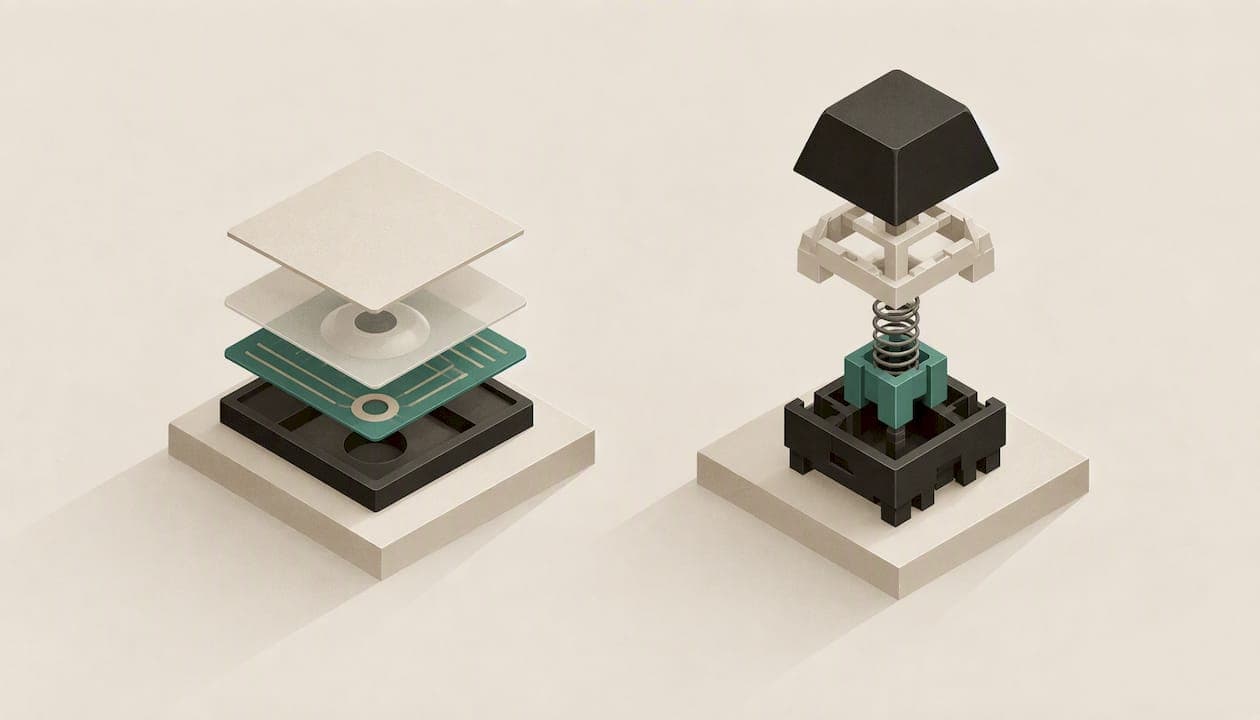
Choose a mechanical keyboard if you type or game for hours and want a board you can repair, customize and keep for years. Choose a membrane keyboard if you want a quiet, cheap board for light use. The gap in price is real, but the gap in comfort is smaller than most guides claim, and it depends on a factor neither label tells you: how much force each keypress takes.
Below we cover how the two designs work, what they cost in Canada, how they compare for typing and gaming, and how to choose without overspending.
TL;DR
- Mechanical boards use an individual switch under every key. Membrane boards use a rubber or silicone layer, so one dome press registers every keystroke.
- In Canada, quality membrane keyboards run roughly $20 to $70 CAD, while mid-range to premium low-profile mechanical boards run roughly $140 to $230 CAD.
- For fatigue, actuation force matters more than the technology: lighter switches reduce muscle load on either type.
- Expect a 2 to 4 week adjustment period if you move from membrane to mechanical, so judge a new board after a month, not a day.
- Hot-swappable mechanical boards let you replace a single switch instead of the whole keyboard.
Table of Contents
- How the two designs actually work
- Mechanical vs membrane at a glance
- Feel and noise: what you will notice on day one
- Typing: speed, accuracy and fatigue
- Gaming: rollover, response and durability
- Durability and the real cost of ownership
- Who should choose which
- How to test before you commit
- Our perspective: the layout deserves as much thought as the switch
- Learning a new layout without losing your week
- Where KeBe fits
- Common mistakes when choosing
- FAQ
- Sources
How the two designs actually work
Every key sits on top of a switch. The plastic cap is only a cover; the switch underneath is what registers your input. The two designs do that job differently.
Membrane keyboards place a thin rubber or silicone layer under the keys. Pressing a key deforms that layer and completes an electrical circuit at the bottom of the key travel. The whole keystroke happens in a single stage. There is no distinct point where you feel the key has "registered", so you tend to press all the way down.
Mechanical keyboards give each key its own switch with a spring and moving parts. The key registers partway through its travel, at the actuation point, so you can ease off before bottoming out. Switches come in several feels: smooth and linear, tactile with a bump, or clicky with an audible snap.

There is also a middle ground. Laptop-style scissor-switch keyboards are a form of membrane design with a stabilizing frame and a shallower, crisper press. If you type on a laptop today, that is likely what you are used to.
Mechanical vs membrane at a glance
| Factor | Mechanical | Membrane |
|---|---|---|
| Feel | Distinct, consistent; choice of linear, tactile or clicky | Softer, often described as mushy, with no clear actuation point |
| Noise | Louder by default, though dampened and low-profile versions are quieter | Generally quieter |
| Typical price in Canada | About $140 to $230 CAD for mid-range to premium low-profile | About $20 to $70 CAD for quality models |
| Simultaneous keys | Usually full N-key rollover | Often limited to 6 to 8 keys or fewer |
| Repair | Individual switches can be replaced, especially on hot-swap boards | Usually replace the whole board |
| Customization | Keycaps, switches, lighting, layouts | Limited |
| Learning curve | Short adjustment period | None if you already use one |
The price row comes from a Canadian roundup of low-profile mechanical boards, so treat it as a range, not a quote. Prices move, and sales are common.
Feel and noise: what you will notice on day one
Most people feel the difference in the first minute. A membrane key has to be pushed down further, and it lacks real tactile feedback beyond the rubber dome collapsing, so many typists press harder than they need to. A mechanical switch tells you when the key has registered.
Noise is the honest trade-off. Mechanical boards are generally louder, and a clicky switch in a shared office or a quiet home is a bad idea. If you share space, look at linear or tactile switches, low-profile designs and a board with a dense case, all of which cut the clatter. A membrane board is quieter out of the box, and that is a legitimate reason to choose one.
Typing: speed, accuracy and fatigue
This is where the marketing runs ahead of the evidence.
Speed is mostly adaptation. Experienced typists who switch from membrane to mechanical often see a temporary dip in performance for 2 to 4 weeks before sustained gains in speed and accuracy appear. If you test a mechanical board for an afternoon and feel slower, that is normal. If you commit for a month, the same source suggests the benefit compounds into fewer errors and less strain over years.
Fatigue depends on force. A study on keyswitch make force found that switches needing more than 1.02 N increased muscle activity in the finger flexors by about 20% and applied force by about 40% compared with 0.47 N switches. Lower make force of 0.47 N or under is the recommended range for reducing the load on forearm tendons and muscles. That holds whatever technology sits under the key.
So the practical advice is this: do not assume "mechanical" means "gentler". Check the actuation force in the specification. Light mechanical switches and a well-designed membrane board can both be comfortable. A heavy switch of either type is not.
Layout matters too. Switch technology is one variable. How far your fingers travel is another. A conventional staggered layout makes your fingers reach diagonally for many keys. A straight-column grid and a layout that keeps common letters near the home row cut that movement, which is the idea behind our own boards (more on that below).

Gaming: rollover, response and durability
For gaming the case for mechanical is stronger. Mechanical keyboards almost universally support N-key rollover, which lets the board register many simultaneous presses. Many membrane keyboards are limited to a handful of simultaneous keys or lack rollover entirely, so in a fast sequence with movement, ability and modifier keys held together, a command can be missed.
Two other things help gamers:
- Consistent actuation. The key registers at the same point every press, so your muscle memory transfers from one match to the next.
- Lower-travel options. Low-profile mechanical switches shorten the distance between rest and registered input. Per the Canadian roundup above, low-profile boards typically have 2.5 to 3.0 mm of key travel against 3.5 to 4.0 mm for standard mechanical.
If you play casually a few evenings a week, a membrane board with decent rollover is fine. If you play competitively, rollover and consistency are worth the extra spend.
Durability and the real cost of ownership
The sticker price hides the long-term picture. A proprietary membrane keyboard generally needs complete replacement if a key or its contact fails. A hot-swappable mechanical keyboard allows component-level repairs, with replacement switches often around $20 a set, which can extend a board's life for a decade or more according to that analysis.
Here is a worked example using the ranges above and treating them as illustrative, not as a guarantee of lifespan:
- You buy a $40 membrane board and replace it every two or three years as keys wear out.
- Over ten years that is roughly three to five boards.
- A mechanical board at the lower end of the mid-range ($140) that you keep and repair with a $20 switch set costs less per year if it lasts the decade.
It will not work out that way for everyone. If you type a few hundred words a week, the cheap board may never wear out. The longer you use the keyboard each day, the faster the maths tips towards mechanical.
Who should choose which
A membrane keyboard suits you if:
- You share a room or office and noise is a concern.
- You use the computer lightly or occasionally.
- You want the lowest upfront price, or a spare board for a second desk.
- You do not care about swapping switches or keycaps.
A mechanical keyboard suits you if:
- You type for hours every day, as a writer, developer, analyst or student.
- You play games where simultaneous inputs matter.
- You like adjusting the feel, lighting and keycaps.
- You want a board that can be repaired rather than replaced.
Choose by force, not by label, if comfort is your main reason for upgrading. Look for the actuation force in the specs and aim low.
How to test before you commit
Because the adjustment takes weeks, a short trial misleads. A better approach:
- Check the actuation force of the switch and favour lighter options if you type all day.
- Pick a noise level you can live with. If in doubt, choose a quieter switch type.
- Confirm N-key rollover if you game.
- Look for hot-swap sockets, so a wrong first choice is a $20 fix, not a new keyboard.
- Give the new board a full 2 to 4 weeks before judging your speed and comfort.
- Keep your old keyboard around for the first week in case you need a deadline-day fallback.
Our perspective: the layout deserves as much thought as the switch
Most comparisons stop at switch type. We think that is only half the story. Whether a key is mechanical or membrane changes how it feels under your finger, but it does not change how far your finger has to travel to reach it.
That is why KeBe boards combine a Matrix-Dvorak layout with a straight-column key grid and hand-centred letter placement. The aim is to minimize finger movement, which is where we see typing fatigue and wasted effort starting. A comfortable switch on a layout that makes you stretch is still a stretch, thousands of times a day.
We also build around the things people end up wanting after a few months with a first mechanical board: hot-swappable switches, per-key RGB lighting, built-in USB-C ports and a hub, a screwless nylon case, automatic typo correction and a dual-spacebar design. Our boards are assembled by hand in Canada. The KeBe v2 is mechanical with low-profile switches. The KeBe Lite is planned as a slim membrane model for people who prefer that feel, so we do not think of the choice as a war between the two technologies. It is a question of what suits your hands and your desk.
The one thing we ask is patience. A new layout and a new switch both need time. Plan on a few weeks, use a trainer, and judge the result after that.
— Joshua
Learning a new layout without losing your week
Moving to Matrix-Dvorak is a bigger change than swapping switch types, so practise before the board arrives. Our free Dvorak typing trainer teaches one letter at a time, so you can build the habit on your current keyboard and arrive with the basics already in your fingers. Combine that with the 2 to 4 week adaptation window described earlier and the dip in speed stays short.
Where KeBe fits
If you have decided that a mechanical keyboard is the right move, our KeBe store for Canada lists the current models, including pre-order and waitlist options for upcoming releases. You can read about the KeBe v2 mechanical low-profile keyboard and the planned KeBe Lite slim membrane model on their own pages. We do not publish prices in this article, so check the store for current figures.
Common mistakes when choosing
Buying on price alone. The cheapest board costs the most if you replace it repeatedly, and the most expensive one costs the most if you never use its features. Match the board to your hours at the desk.
Ignoring noise. The loudest mistake is a clicky switch in a shared space. Try the sound before you buy, or pick a quieter type.
Expecting instant speed gains. The dip is normal. Measure your typing after a month, not after an afternoon.
Forgetting wrist posture. Height matters. Low-profile boards usually do not need a wrist rest, whereas standard-height mechanical boards almost always do. If you already have wrist or forearm pain, see a physiotherapist or occupational therapist about your desk setup rather than relying on a keyboard to fix it.
FAQ
Is a membrane or mechanical keyboard better?
Neither wins everywhere. Mechanical is better for heavy typing, gaming and long-term repairability. Membrane is better for quiet, low-cost, light use. For comfort, the switch's actuation force matters more than the technology.
Which type of keyboard is best for gaming?
Mechanical, in most cases. These boards typically support full N-key rollover, so several simultaneous inputs register, and many membrane boards limit this. Casual players can still be happy with a decent membrane keyboard.
How long do membrane keyboards last?
It varies by model, and many makers publish no keystroke rating at all. The practical difference is that when a membrane board fails you usually replace all of it, while a hot-swappable mechanical board lets you replace a single switch.
Why is a mechanical keyboard good for typing?
Each key has its own switch, so the feel is consistent and you can tell when a keypress has registered. That can reduce over-pressing. Expect a 2 to 4 week adjustment before speed and accuracy improve.
Sources
- Membrane vs. Mechanical Keyboards: What's the Difference? (How-To Geek)
- Best Low Profile Mechanical Keyboard in 2026 (Celmin)
- The effect of keyboard keyswitch make force on applied force and finger flexor muscle activity (PubMed)
- Mechanical vs Membrane Keyboards: Which Is Better for Typing Speed? (TypingMonk)
- One Dead Key Decides What a Gaming Keyboard Costs (Find Swetrust)
- Membrane keyboards vs. mechanical: What's the difference? (Windows Central)