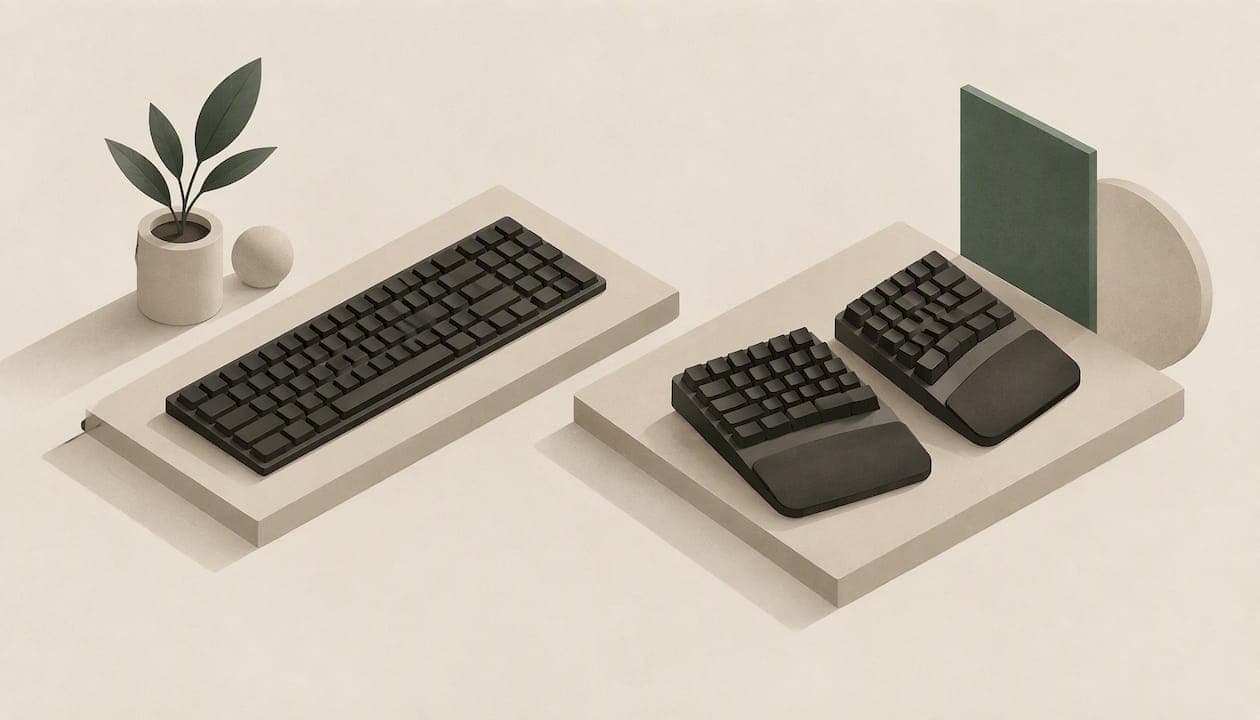
An ergonomic keyboard is better than a regular one at one specific thing: keeping your wrists, forearms and shoulders in a more neutral position while you type. It is not a cure for pain, and it will not fix a badly set up desk. If you type for hours a day, it is often worth the switch. If you type lightly, a regular keyboard that is well positioned may be all you need.
Below, we compare the two on posture, speed, noise, gaming and cost of switching, then give you a simple way to decide.
TL;DR
- Ergonomic keyboards (split, tented or column-aligned) reduce awkward wrist angles. A regular flat keyboard cannot adjust to your body.
- Evidence for long-term pain relief from the keyboard alone is weak. Chair, desk height, breaks and mouse placement matter just as much.
- Expect a short dip in speed at first. Experienced touch typists usually recover within hours, sometimes much faster.
- A regular keyboard in the right position can be more ergonomic than a poorly adjusted fancy one.
- Try before you commit, and pick for your actual use: long writing days, gaming, shared desks or quiet offices.
Table of Contents
- What "ergonomic" actually means
- Ergonomic vs regular keyboard: the main differences
- What the research says about posture
- Speed and the learning curve
- The workstation matters more than the keyboard
- Mechanical, membrane and low profile: the other choice you are making
- Who should switch, and who can stay
- Our perspective
- How to choose: a short checklist
- Try a KeBe keyboard
- FAQ
- Sources
What "ergonomic" actually means
The word describes a goal, not a shape. According to the Canadian Centre for Occupational Health and Safety (CCOHS), there is no universally agreed "best" keyboard design, and users are encouraged to try different models and see which suits them. What counts is whether the keyboard helps you keep straight wrists, relaxed shoulders and forearms roughly level.
That is why the comparison is not as simple as "curvy beats flat". A regular keyboard placed at the right height, with your elbows bent at a comfortable angle and your wrists straight, can serve you better than a split board perched too high on a desk.
What a regular keyboard is
A regular (also called conventional or standard) keyboard is a single flat rectangle with staggered rows, the layout most of us learned on. Letter keys sit in offset rows, left and right hands are pushed together in the centre, and the forearms usually rotate palms-down to reach it. It is compact, cheap, and everywhere.
What counts as an ergonomic keyboard
Ergonomic keyboards change one or more of these things:
- Split design: two halves that let your hands sit at shoulder width.
- Tenting: halves tilted so your forearms rotate toward a handshake position.
- Column alignment (ortholinear): keys in straight vertical columns, matching how fingers actually move, instead of the diagonal stagger inherited from typewriters.
- Low profile or negative tilt: a flatter body that keeps the wrist from bending upward.
- Layout changes: letter placement that reduces finger travel.
Ergonomic vs regular keyboard: the main differences
| Factor | Regular keyboard | Ergonomic keyboard |
|---|---|---|
| Wrist posture | Fixed, often with outward wrist angle | Adjustable or built-in neutral angle |
| Forearm rotation | Palms flat, fully pronated | Reduced when tented |
| Finger reach | Staggered rows, diagonal reaches | Often straight columns, less lateral stretch |
| Learning curve | None | Hours to a few days for most typists |
| Noise | Varies, usually quiet membrane | Varies by switch type |
| Price | Lowest entry cost | Usually higher |
| Portability | Easy | Varies, split boards take more room |
What the research says about posture
This is the strongest argument for ergonomic designs. CCOHS notes that adjustable split or slanted keyboards help people hold neutral wrist postures. In the research summarized there, a split design can bring ulnar deviation (the sideways bend of the wrist toward the little finger) from roughly 10 degrees to within about 2.5 degrees of neutral. Tenting the halves by 20 to 30 degrees can also cut forearm pronation substantially. A systematic review of controlled trials on alternative keyboard designs looked at this same question for office workers.

A broader review of experimental data on alternative keyboards in the Journal of Orthopaedic & Sports Physical Therapy reaches a consistent conclusion: the designs change posture in measurable ways.
Posture is not the same as pain
Here is the honest part. Better wrist angles do not automatically mean less pain. The same body of research shows no clear difference in long-term musculoskeletal pain from changing the keyboard alone, because discomfort at a desk comes from many sources. An investigation of alternative QWERTY keyboards frames keyboard design as one occupational risk factor among several.
So treat a keyboard as a strong lever for posture, and a modest lever for comfort. If you already have pain, tingling or numbness in your hands, see your doctor or a physiotherapist rather than buying your way out of it.
Speed and the learning curve
The fear of lost speed keeps many people on regular keyboards. The evidence is more reassuring than the fear. Some studies report an initial drop in productivity of about 10% to 20% when moving to an unfamiliar ergonomic layout, and that experienced typists tend to regain their baseline after an orientation period of roughly 2 to 10 hours, per the JOSPT review. The same review describes experienced 10-digit touch typists adapting to some ergonomic features within about 10 minutes.
The type of change matters:
- Mild changes (a gentle split, a tilt, a low profile) are the fastest to adapt to.
- Column-aligned keys feel strange for a day or two, because your fingers reach straight up instead of diagonally.
- Full layout changes take longest, but they are also where the biggest gains in finger travel come from.
If you touch type, you will adapt quicker. If you look at the keys, expect a bumpier first week. A free trainer helps: our Dvorak typing trainer teaches one letter at a time, so you build muscle memory without relearning everything at once.
A realistic first-week plan
- Day 1: Use the new keyboard for 20 to 30 minutes at a time for low-stakes tasks such as personal email.
- Days 2 to 3: Move to an hour or two of real work, keeping your old keyboard nearby for deadlines.
- Days 4 to 5: Switch fully for your normal day. Take short breaks to stretch.
- Week 2: Check your speed and accuracy. Most people are close to where they started.
The workstation matters more than the keyboard
A keyboard is one piece of a posture chain. The CCOHS guidance on keyboards points to elbows at roughly 90 to 110 degrees, straight wrists and a relaxed shoulder position. If your chair is too low or your desk too high, no keyboard will rescue you.
If you want a quick checklist for your setup, this guide to home office ergonomic fixes covers placement and the rest of the desk. And if you already feel strain building after long days, these desk back pain fixes cover movement and posture habits worth adding alongside any hardware change.
Watch out for wrist rests
Many people assume a wrist rest is always helpful. CCOHS says otherwise: used wrongly, a rest can increase pressure on the carpal tunnel and restrict blood flow. It should support the palm or heel of the hand, not the wrist itself, and match the height and slope of your keyboard. Rest the hands between bursts of typing rather than anchoring them while you type.

Mechanical, membrane and low profile: the other choice you are making
When people compare ergonomic and regular keyboards they usually mix in a second question: what kind of switch. These are separate decisions.
- Membrane keyboards are usually quiet, soft and affordable. Our guide on mechanical vs membrane keyboards goes through feel, noise and durability.
- Mechanical keyboards give distinct feedback and are customizable, but can be loud. The research summary we reviewed cites an average of about 47 dB in recent tests, though internal dampening and low-profile switches can make modern boards much quieter, according to the World Physiotherapy review.
- Low-profile switches have shorter travel, often around 1.6 to 2.0 mm, and keep your hands lower. For more detail, see what low-profile keyboards are and who they suit.
Size is a third factor. A compact board brings your mouse closer, which helps your shoulder. Our comparison of 60% vs 75% keyboards helps you pick.
Who should switch, and who can stay
Switch if
- You type for several hours most days: writing, coding, data entry, support.
- You notice your wrists bending outward or your shoulders creeping up.
- You are curious about a layout that shortens finger travel.
- You like to customize switches, keycaps and lighting.
Stay with a regular keyboard if
- You type in short bursts and have no discomfort.
- You move between many shared computers and need identical muscle memory everywhere.
- You have not yet fixed your chair and desk height. Do that first, since it costs little or nothing.
Gamers
For games, the keyboard debate is mostly about switch speed. Shorter travel can feel quicker, but the difference is often subtle and subjective. An ergonomic layout with straight columns can feel natural for movement keys, though you should check that your games' default bindings still sit comfortably. Hot-swappable switches let you tune the feel without buying a new board.
Our perspective
We built KeBe because we think the biggest ergonomic problem is not only the angle of your wrists. It is the distance your fingers travel. The standard layout evolved around typewriter mechanics, with staggered rows and letters scattered in ways that make your fingers work harder than they have to.
So our keyboards combine a straight-column key grid with the Matrix-Dvorak layout, which places letters to keep your hands centred and your finger movement low. We add a dual-spacebar design, automatic typo correction to ease the transition, and a typing trainer so you are not left to fight muscle memory alone. Each board is assembled by hand in Canada.
We will also say plainly what a keyboard cannot do. It will not replace a good chair, regular breaks or a properly placed mouse. If you are in pain, see a health professional. If you are healthy and want to type with less effort, a well-designed keyboard is one of the more enjoyable upgrades you can make, and the first week of adjustment is shorter than most people expect.
— Joshua
How to choose: a short checklist
- Fix the desk first. Elbows around 90 to 110 degrees, wrists straight, screen at a comfortable height.
- Decide how far you want to go. Gentle tilt, column-aligned keys, a full split, or a new layout.
- Choose your switch feel. Quiet and soft, or tactile and clicky, or low-profile and fast.
- Check noise. If you share a room or take calls, favour dampened or low-profile switches.
- Plan the transition. Keep your old keyboard for the first week and use a trainer.
- Reassess after two weeks. If your wrists feel more neutral and your speed is back, you have your answer.
Try a KeBe keyboard
If you want an ergonomic keyboard with a straight-column grid, hot-swappable keys, per-key RGB lighting, USB-C ports with a built-in hub and a screwless nylon case, see the KeBe store. The mechanical KeBe v2 uses low-profile switches. We also offer pre-orders and a waitlist for upcoming models, including the slim membrane KeBe Lite.
FAQ
Is an ergonomic keyboard better than a regular one?
For wrist and forearm posture, yes. Research shows that split and slanted designs reduce ulnar deviation compared with flat keyboards. For long-term pain, the evidence is weaker, because the rest of your workstation and your habits matter just as much.
Will an ergonomic keyboard slow me down?
Usually only briefly. Some studies report an initial 10% to 20% dip, and experienced typists often return to their usual speed within a few hours of use. The more radical the change, the longer it takes.
Can a regular keyboard be ergonomic?
Yes, if it is positioned well. A flat keyboard at the right height, with straight wrists and relaxed shoulders, can beat a split keyboard that is set up poorly. Ergonomics is about the posture you end up in.
Do I need a wrist rest with an ergonomic keyboard?
Not necessarily. A rest used incorrectly can raise pressure on the carpal tunnel. If you use one, it should support the heel of your palm, not your wrist, and match the keyboard's height.
Sources
- CCOHS: Office Ergonomics, Keyboard Selection and Use
- CCOHS: Office Ergonomics, Wrist Rests
- Design Features of Alternative Computer Keyboards: A Review of Experimental Data (JOSPT)
- Alternative Ergonomic Keyboard Designs and How They Impact Office Work: A Systematic Review (World Physiotherapy)
- Study of alternative QWERTY keyboards (CDC Stacks)
- Home Office Essentials: Four Ergonomic Fixes
- Desk Back Pain Relief for Office Workers