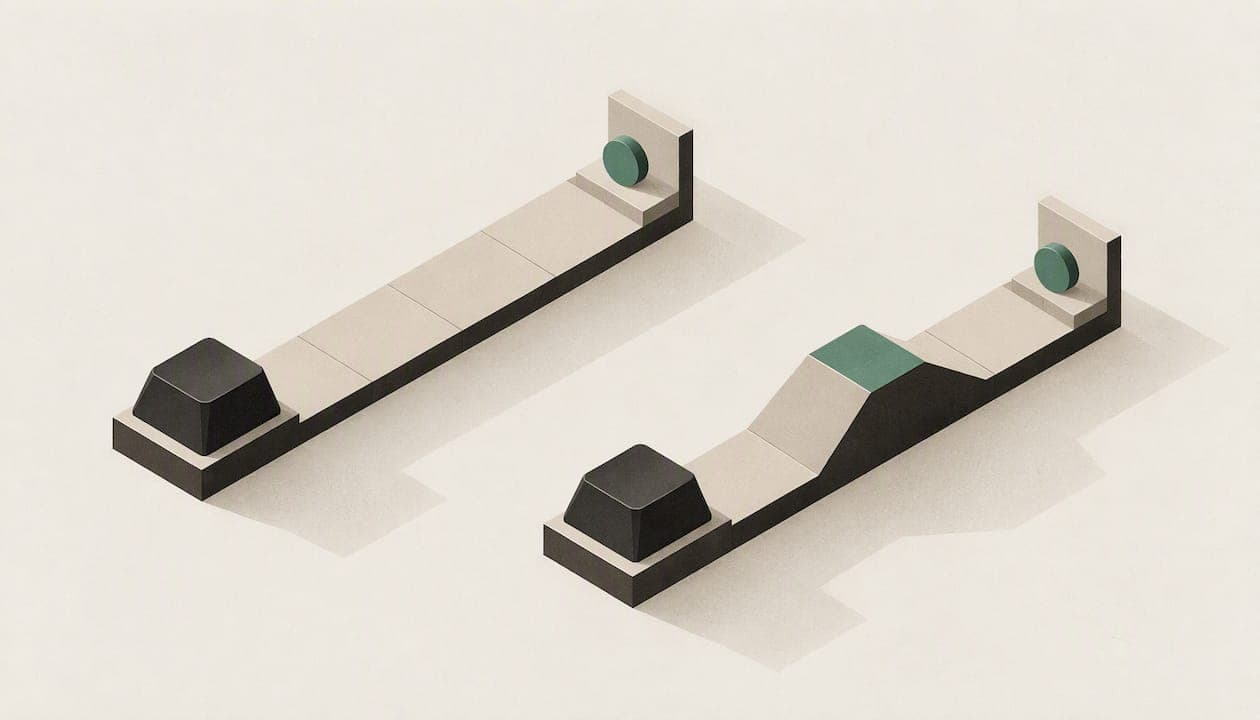
Linear switches travel smoothly from top to bottom with nothing to feel along the way. Tactile switches have a small bump partway down the press, so your finger knows the key has registered. For most people who type for a living, a light-to-medium tactile switch is the safer starting point. For fast, repeated taps in games, linear is the usual pick. The rest of this guide explains why, and where each rule breaks.
TL;DR
- Linear: smooth, consistent travel with no bump. Favoured by gamers for rapid repeated presses and double-taps.
- Tactile: a bump marks the moment the key registers. Typists often prefer it for accuracy and for the cue to stop pressing.
- Same weight, different feel: two switches with the same listed actuation force can feel very different, because the force curve matters more than the number.
- Technique beats switch type: bottoming out hard on any switch is what tires your fingers, and either type can be typed gently.
- Not sure? Buy a board with hot-swappable sockets and change the switches later, instead of guessing once.
Table of Contents
- What actually separates the two
- Linear vs tactile at a glance
- Linear vs tactile for typing
- Linear vs tactile for gaming
- Why the force number can mislead you
- Our view: pick for your hands, then keep the option open
- How to choose in five steps
- A keyboard where you can try both
- Common mistakes when choosing
- FAQ
- Sources
What actually separates the two
Both switch types are built on the same idea. Press a key, a stem moves down against a spring, and a contact closes at a certain point called the actuation point. The difference is what your finger feels on the way there.
A linear switch moves smoothly with no feedback event, and the resistance rises evenly as the spring compresses. A tactile switch adds a bump. As the guide at Ergo Type puts it for the classic tactile design, there is a bump you can feel when the key registers, without the audible click of a clicky switch.

That is the whole mechanical difference. Everything else people argue about, from speed to fatigue to noise, follows from it.
Why the bump matters
The bump gives you a physical signal that the keystroke counted. You do not need to push to the bottom of the key to be sure. A linear switch gives no such signal, so your finger relies on habit, on sound, or on the screen.
That is why typists tend to like tactile switches. Research summarised for us points the same way: typists often prefer tactile switches because the bump improves accuracy and reduces bottoming out, while gamers generally prefer linear switches for smooth, consistent travel.
Linear vs tactile at a glance
| Feature | Linear | Tactile |
|---|---|---|
| Feel | Smooth, even travel | Bump partway down the press |
| Feedback that the key registered | None from the switch itself | Physical bump |
| Typical strength | Rapid repeated presses, double-taps | Accuracy, rhythm, knowing when to stop pressing |
| Typical sound | Usually the quieter of the two, though it depends on the board | Usually a little more sound from the bump and return |
| Common worry | Easy to bottom out without noticing | Bump can feel like resistance if you want a very light press |
| Best fit | Gaming, light-touch typists | Writing, coding, office work |
The sound row is a tendency, not a rule. Case material, keycaps, lubrication and plate all change how a switch sounds, so a well-built board with tactile switches can be quieter than a hollow one with linears. If noise matters in a shared office or a Toronto condo, test the whole keyboard, not only the switch.
Linear vs tactile for typing
If you spend hours writing, the question is less about speed and more about accuracy and comfort.
Accuracy and rhythm
With a tactile switch you can feel registration before the key hits the bottom. Many people develop a steadier rhythm because each keystroke has a clear start and finish. Linear typists can be just as accurate, but they usually need a lighter spring, and some need a few weeks to stop mistyping keys they brushed against.
A study published in the journal Industrial Engineering & Management Systems compared clicky, tactile and linear switches with different keycap heights, measuring typing speed, accuracy and user satisfaction. The takeaway for a buyer is that switch type is one factor among several, and your keycaps and posture belong in the decision too.
Fatigue and the bottoming-out problem
Many people assume a heavier switch tires the hand more. It is not that simple. The same research describes how linear switches can cause discomfort when the lack of feedback leads users to hammer keys to the bottom, and how a light-to-medium tactile switch can support a better technique by signalling when to stop.
The same source stresses that technique matters more than the switch. If you worry about finger fatigue or repetitive strain, the practical advice is to avoid constantly bottoming out and let the key come back up right after it registers. That works on any switch. A tactile bump makes it easier to learn, and a light linear makes it easier to do once you have.
If you already have pain in your hands, wrists or forearms, see a physician or a physiotherapist or occupational therapist. A switch cannot treat a medical problem, and no article, including this one, replaces an assessment.

Mechanical vs membrane is a bigger jump
If you are coming from a laptop or a rubber-dome board, the bigger change is mechanical versus membrane, not linear versus tactile. One review of the evidence notes two ways mechanical switches could theoretically lower strain: lower actuation force and tactile feedback. Both are theoretical benefits rather than guarantees. If you are still deciding between the two families, our guide to mechanical vs membrane keyboards walks through it.
Linear vs tactile for gaming
In games, the argument flips. A linear switch has no bump to get past, so a quick double-tap or a rapid strafe feels cleaner. That is why gamers generally lean towards linear switches with light actuation forces for quick taps and movement.
There is a newer twist. High-end competitive boards are moving towards magnetic Hall Effect switches. One review of a keyboard with linear Hall Effect switches says they offer adjustable actuation and rapid trigger, which traditional mechanical switches cannot replicate. Another source reports latencies as low as 0.5 ms for these designs against 3 to 12 ms for traditional mechanical switches. If you play competitive shooters at a high level, that is worth knowing. For everyone else, the human reaction is far slower than any of these differences, and the feel of the switch matters more than the numbers.
A practical note for gamers who also work at their desk: many people find a linear switch fine for games and a bit vague for long writing sessions. If your keyboard does both jobs, choose the switch for the activity where you spend most of your hours.
Why the force number can mislead you
Spec sheets list an actuation force in grams. It is tempting to compare 45 g with 45 g and call them equal. They are not.
A force curve shows how resistance changes through the whole press. A tactile switch climbs to a peak before the bump releases. One analysis of a classic tactile design describes resistance climbing to about 55 g before the mechanism triggers, then dropping to 45 g at actuation. The same article explains why a tactile switch can feel heavier than a linear one with the same nominal actuation force: the pre-actuation spike is what your finger notices.
What to do with this:
- Do not rank switches by grams alone.
- Expect a tactile switch to feel a step heavier than its number suggests.
- If you want a very light touch, a linear is the easier route. If you want a deliberate, confident press, a tactile is.
- Look at travel distance too. Short-travel designs, such as those found on low-profile boards, change the feel again.
Travel varies a great deal between designs. A Hall Effect linear in one review has a short travel of around 3.3 mm, while another review lists a tactile with 2.2 mm travel and a 0.6 mm bump. Short travel gives you less distance to bottom out, which is one reason low-profile boards suit some typists. Our guide to low profile keyboards covers who they suit.
Our view: pick for your hands, then keep the option open
We build keyboards, so people ask us which switch is best. Our honest answer is that it depends less on the switch than on how you press it.
KeBe boards use a Matrix-Dvorak layout with a straight-column key grid and hand-centred letter placement, designed to reduce finger movement. We built them that way because we think comfort comes from the whole system: the layout, the key spacing, the travel and the switch together. A switch alone will not fix a layout that makes your fingers travel too far.
Our practical advice:
- If you type all day, start with a light-to-medium tactile switch and focus on releasing the key as soon as the bump passes.
- If you game first, start with a linear, and be honest with yourself about whether you bottom out every press.
- If you are unsure, choose a board where you can change your mind. The KeBe v2 is hot-swappable, which means you can try a different switch type without buying a new keyboard or soldering anything.
- If you are learning a new layout, the feedback of a tactile switch can help while you build new habits. Our free typing trainer teaches Dvorak one letter at a time.
We would rather you buy the right switch for your hands than the one in the loudest review.
— Joshua
How to choose in five steps
- List your hours. Count how many hours a week you write, code, game or do a mix. Choose for the biggest block.
- Check your habit. Do you slam keys to the bottom? If yes, a tactile switch gives you a cue to ease off. If you already type lightly, a linear will feel effortless.
- Consider your room. Shared spaces favour a board that is dampened overall, whichever switch it carries.
- Look at the force curve, not only the grams. Remember the tactile spike.
- Keep it reversible. A hot-swappable board lets you change the switches in minutes, so a wrong first guess costs you little.
If you also need to settle how big your keyboard should be, read 60% vs 75% keyboards before you order.
A keyboard where you can try both
The KeBe v2 is a mechanical, low-profile, ortholinear keyboard with hot-swappable keys, per-key RGB lighting, an integrated USB-C hub, a screwless nylon case and a dual-spacebar design with autocorrect. Every board is assembled by hand in Canada. You can see what is available, including pre-orders and the waitlist for upcoming models, in the KeBe store.
Common mistakes when choosing
Buying on the sound of a video. Microphones, desk mats and case foam change what you hear. A switch that sounds crisp in a review may sound different on your desk.
Assuming linear means quiet. Linear switches often avoid the bump noise, but bottoming out on a hard plate is still loud. Pressing gently does more for noise than the switch family does.
Choosing the lightest spring available. Very light linears can lead to accidental presses for typists who rest their fingers on the keys. A little resistance is a feature.
Ignoring the layout. If your keyboard forces long finger reaches, the switch type will not rescue you. This is why we pair our boards with a layout built to cut finger movement.
Skipping the adjustment period. Any new switch feels odd for the first week or two. Give it a fair trial before judging.
FAQ
Which is better, linear or tactile?
Neither wins outright. Tactile switches suit most typists because the bump confirms the keystroke and helps you avoid bottoming out. Linear switches suit gamers and light-touch typists who want smooth, quick presses. Choose for the activity that fills most of your day.
Do pro gamers use linear or tactile?
Linear switches are the usual choice because they allow rapid double-taps without a bump to get past. At the top end, competitive players are moving to magnetic Hall Effect switches with adjustable actuation. Tactile is still a valid choice if you prefer the feedback.
Which is louder, tactile or linear?
Tactile switches are often slightly louder because of the bump and return, but the board matters more than the switch type. Case design, keycaps, lubrication and how hard you press all change the sound. Clicky switches are the loud ones, not tactile.
Are tactile switches better for avoiding finger fatigue?
They can help, because the bump tells you when to stop pressing. Researchers say technique matters more than switch type, though, so focus on letting the key release right after it registers. For persistent hand or wrist pain, see a physician or a physiotherapist.
Can I change my switches later?
Only if your keyboard is hot-swappable. On a hot-swap board you pull the old switches and press in new ones, with no soldering. That is why we recommend it for anyone who has not yet found their preference.
Sources
- Mechanical Keyboard Switch Guide: Linear vs. Tactile vs. Clicky
- Cherry MX Red vs Brown vs Blue: Find Your Perfect Mechanical Switch
- Redragon Fizz RGB, LTT Labs
- Industrial Engineering & Management Systems: switch type and keycap height study
- Mechanical Keyboards and RSI: What the Science Says
- Neo65 Sonic HE+ Keyboard Review
- Cherry MX Blue vs Red: The Force Curve Deception
- Keychron V1 Review, OrientDeck