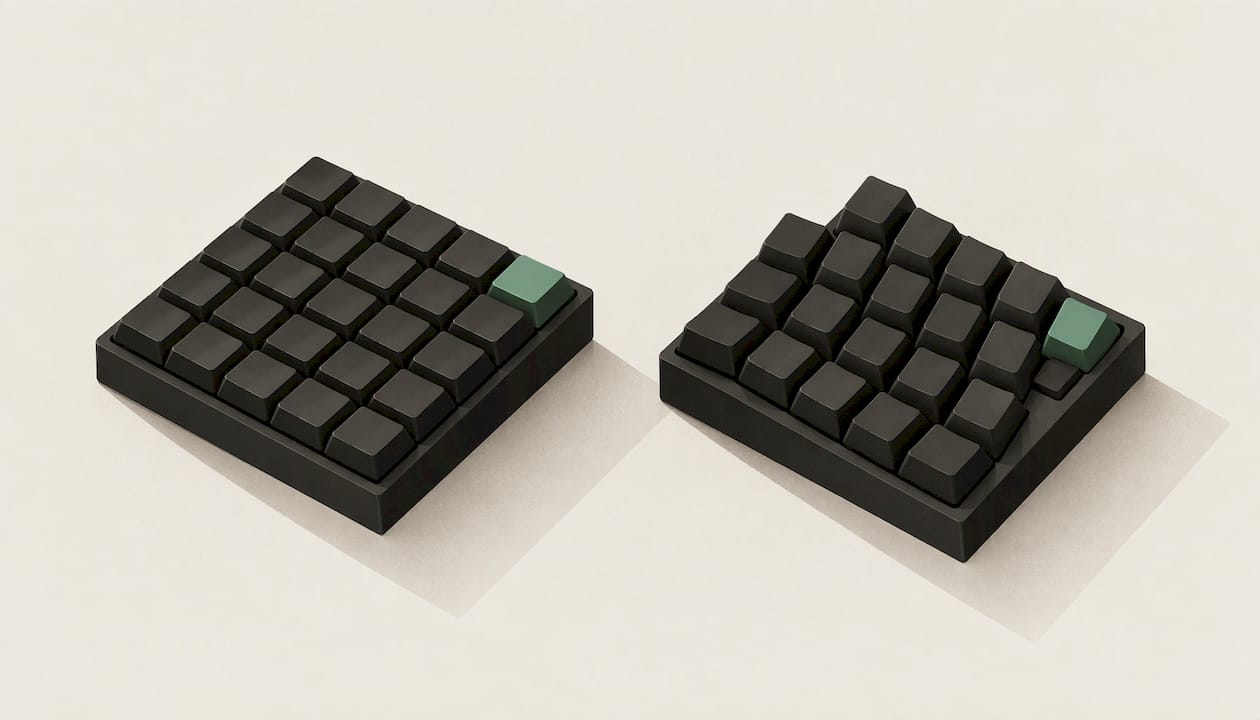
Ortholinear and columnar keyboards both get rid of the sideways offset between rows that standard keyboards inherited from the typewriter. The difference is what happens to the columns. On an ortholinear board every key sits in a perfect grid. On a columnar (column-staggered) board each column is straight but shifted up or down to match the length of the finger that uses it. For most typists, the straight grid is the simpler, more consistent way to get the benefit, and it is the design we build KeBe keyboards around.
TL;DR
- Ortholinear means zero stagger: keys form a rectangular grid. Columnar (column-staggered) keeps straight columns but offsets each one vertically to suit finger length. The terms overlap, and some people use them loosely.
- Both remove the row-to-row offset of a standard keyboard, so each finger moves straight up and down its own column.
- Expect a re-learning period. Reviewers report speeds dropping sharply at first and recovering over weeks to months.
- Neither layout is a medical treatment. Wrist position, breaks and posture matter as much as key alignment.
- If you want the grid plus a layout built around it, a Matrix-Dvorak keyboard from KeBe pairs straight columns with hand-centred letter placement.
Table of Contents
- What the two terms mean
- How the three alignments differ
- Why the grid is the more consistent design
- Comfort and fatigue: what the evidence supports
- Speed and the learning curve
- Gaming and frequently used keys
- Customization: modifiers, layers and keymaps
- How to choose between them
- The KeBe approach
- Where to get a grid keyboard
- FAQ
- Sources
What the two terms mean
A stagger is the sideways offset between rows of keys. On a conventional keyboard, each row is shifted from the one above it. The Keyboard Wiki describes the classic QWERTY layout as double staggered, with offsets of half a key, a quarter of a key and half a key, a legacy of typewriter key arms that needed room to swing past one another.
Two layouts remove that offset:
- Ortholinear (also called matrix): no stagger at all. According to the Deskthority wiki, a layout with no staggering is called a matrix, ortho-linear or ortholinear layout.
- Columnar (column-staggered): the Keyboard Wiki notes that columnar layouts are sometimes called column-staggered. The columns are vertical, but each sits at a different height.
So are they the same thing? Not strictly. Ortholinear strictly means zero stagger. In everyday talk, though, people often use "ortholinear" for any board with straight columns, which is why you will find the two terms used interchangeably in forums and product pages. When you compare products, look at the photo, not the label: are all the columns level, or does the middle-finger column sit higher?
How the three alignments differ
| Row-staggered (standard) | Column-staggered (columnar) | Ortholinear (grid) | |
|---|---|---|---|
| Row offset | Yes, each row shifted sideways | None | None |
| Column offset | Not applicable, keys sit on diagonals | Each column shifted up or down | None, all columns level |
| Finger path | Diagonal reaches for many keys | Straight, matched to finger length | Straight up and down |
| Familiarity | Highest | Moderate | Moderate |
Keyboard Builders explains that ordinary keyboards shift rows sideways, with the A row starting a quarter key right of Q and Z another half key on, while ortholinear boards shift nothing. On column-staggered boards the shift runs vertically: on the Corne, the same source reports, the pinky column sits 0.3 of a key lower than the middle-finger column, which is the highest.
The idea behind column stagger is simple: your middle finger is longer than your pinky, so its column should sit further forward. The idea behind a pure grid is also simple: every key has the same position relative to its neighbours, so what you learn for one column transfers to every other.
Why the grid is the more consistent design
On a standard board, reaching for a key such as B or Y means moving a finger diagonally across a staggered row. The result is that the same finger moves at a different angle for each row. On a grid, a finger goes up for the row above and down for the row below, along the same line every time. That predictability is what many typists mean when they say a grid "feels like typing on paper".
A column-staggered board adds a second variable: you learn the offset of each column. For some hands that is a good fit. For others, especially people who switch between keyboards, a uniform grid is easier to build muscle memory on, and keycaps and layouts are easier to set up because every position is the same distance from the next.
That consistency is why we chose a straight-column grid for KeBe. Our keyboards use the Matrix-Dvorak layout, with a straight-column key grid and hand-centred letter placement designed to minimise finger movement and typing fatigue. If you want the background on the grid itself, our guide to the ortholinear keyboard layout compared with staggered goes deeper.
Comfort and fatigue: what the evidence supports
Here is the honest picture. Key alignment is one part of the comfort equation, and the best-researched factors are about your wrists.
The Canadian Centre for Occupational Health and Safety (CCOHS) says there is no universally agreed best keyboard design and that the goal is a neutral wrist position. It recommends trying different models, considering a split keyboard to reduce ulnar deviation, and considering a tented keyboard for conditions such as epicondylitis. Ulnar deviation means the wrists bending outward toward the little finger. If you already have pain, numbness or tingling in your hands or wrists, see your doctor or an occupational therapist before changing your setup.
A World Physiotherapy systematic review of 12 articles with 396 participants found moderate-to-high evidence supporting adjustable split or slanted keyboards over standard and virtual keyboards. The point for this comparison: the strongest evidence is for how the keyboard positions your hands, not for grid versus column stagger specifically. A grid layout fits well alongside a split or tented design, and our guide to split keyboards versus standard covers that side of the decision.
CCOHS also stresses that even with a well-chosen keyboard, hands, arms, shoulders and back still tire with heavy use, so short breaks to stretch and recover are essential whatever the layout.

Speed and the learning curve
Plan on a dip. How big depends on the person and on how much you change at once.
A CDC-published study of alternative keyboards (Marklin and Simoneau) measured typing on split and inclined boards at roughly 92 to 96 percent of conventional speed, about 3 to 4 words per minute slower, and found no appreciable performance differences after more than 10 hours of practice. That study looked at split QWERTY boards rather than grids, but it shows how quickly basic adaptation can happen when the layout itself stays familiar.
Changing both the alignment and the key positions is a bigger jump. A WIRED reviewer of an ortholinear board reported going from 25 words per minute at first to 60 and then approaching 90 against a usual 115, with frequent misses and glances down at his hands. A six-month report from a column-staggered user describes starting at about 30 WPM and recovering to a normal 100 to 110.
Two patterns stand out. First, the recovery is real, but it takes weeks, not days. Second, most of the slow-down comes from compact layouts that also move keys onto layers, not from the grid itself. A full-size grid with a number row and familiar modifier positions asks less of you.
Typing speed versus accuracy
Expect more errors than slowdown at the start, especially on keys at the edges of the board. Practise on a trainer rather than on live work, and keep your first week's goals about accuracy. Our guide to a typing trainer keyboard explains how to structure that practice, and KeBe keyboards include a typing trainer and autocorrect to help you through the early stretch.
Gaming and frequently used keys
For gamers, the question is whether WASD, modifiers and reach keys sit where your hand expects them. On a grid, the keys around WASD line up in straight columns, so your fingers move straight to neighbouring keys rather than on a diagonal. Fast response then depends on switch feel, which is where low-profile switches matter: shorter travel means a faster actuation. Our guide to low-profile switches explains how they differ.
The practical advice is to move your most-used game keys first and give yourself a few sessions in a casual mode before taking the keyboard into ranked play. Muscle memory built on a standard board will mislead you for a while.
Customization: modifiers, layers and keymaps
Grid and columnar boards often come in compact sizes, so some keys live on layers, which are alternate key sets reached by holding a layer key. This is where most of the practical effort goes.
Developer Evan Travers describes putting modifiers at the bottom of each column on grid boards, one finger per modifier, while on a column-staggered board he used thumb modifiers and found it challenging to lay out common chords such as Cmd+Shift and Cmd+Option. The lesson: decide where your modifiers go before you start practising, because moving them later costs you the muscle memory you just built.
A few ground rules that work for most people:
- Start with a keymap close to what you use now. A reviewer of 12-column split layouts advises starting similar to your previous keyboard and giving changes time to settle before judging them.
- Limit the number of variants you try. Switching between many keymaps leaves residue in your muscle memory.
- Keep shortcuts you use all day, such as copy, paste and undo, in easy reach.
Hot-swappable switches make experimenting cheaper, because you can change switches without soldering, and per-key RGB lighting can mark layer keys so you stop looking down. If you also need to understand how keyboards are matched and replaced across devices, this explanation of keyboard replacement and matching covers the basics.
How to choose between them
Use these questions in order:
- Do you want one consistent geometry? If you move between devices or share a desk, a straight grid is easier to learn once and apply everywhere.
- How much will you change at once? If you are also changing layout, such as moving to Dvorak, keep the physical board simple. Our Dvorak vs QWERTY guide and alternative layouts overview help you decide whether that is worth it.
- How big a board do you need? Compact boards are rewarding but require layers. Full-size grids keep your number row and function keys.
- Do you have discomfort now? Talk to your doctor or an occupational therapist first, and treat the keyboard as one part of the setup alongside desk height and breaks.
The KeBe approach
We build KeBe around a simple belief: your fingers should travel as little as possible. Standard keyboards make you reach diagonally for keys because typewriter arms once needed the room. That reason is long gone, and the grid removes it.
Our Matrix-Dvorak layout combines a straight-column grid with hand-centred letter placement, so the keys you use most sit under your strongest fingers. We add what a daily typist wants on top: hot-swappable switches, per-key RGB lighting, a dual-spacebar design, autocorrect and a typing trainer to carry you through the first weeks.
Every keyboard is assembled by hand in Canada. For people who type all day, or play all night, we think a grid is the cleanest place to start.
Joshua
Where to get a grid keyboard
KeBe makes ergonomic mechanical and membrane keyboards with the Matrix-Dvorak layout, low-profile switches, hot-swappable keys, per-key RGB lighting, integrated USB-C ports and hub, and screwless nylon cases, assembled by hand in Canada. You can also pre-order upcoming models or join the waitlist from the store.

Browse the full range on the KeBe store. If you are weighing mechanical against membrane first, our mechanical vs membrane guide will help.
FAQ
Is columnar the same as ortholinear?
Not exactly. Ortholinear means no stagger at all, so every key sits in a rectangular grid. Columnar or column-staggered boards keep straight columns but shift each one up or down to match finger length. Many people use the words loosely, so check the photos.
Is an ortholinear keyboard faster?
Not at first. Reviewers report large drops in speed during the first weeks and a gradual recovery. Whether you end up faster depends on practice and layout, so judge it after a few weeks of regular use rather than on day one.
Will a grid keyboard prevent wrist pain?
No keyboard shape guarantees that. CCOHS points to neutral wrist position, split or tented designs where suitable, and regular breaks. If you already have pain, numbness or tingling, see your doctor or an occupational therapist.
Can I use a grid keyboard for gaming?
Yes. WASD and nearby keys sit in straight columns, and low-profile switches shorten travel. Spend a few casual sessions adapting before you rely on it in competitive play.
Sources
- Staggering, Keyboard Wiki
- Staggering, Deskthority wiki
- Ortholinear, row stagger and column stagger, Keyboard Builders
- CCOHS: Office Ergonomics, Keyboard Selection and Use
- Alternative ergonomic keyboard designs, World Physiotherapy
- CDC study PB97-206395
- Work Louder Creator Board review, WIRED
- Six Months with a Corne Keyboard, Engineered.at
- Customizing a Keyboard Layout, Evan Travers
- Key mapping ground rules for 12-column split keyboards
- Laptop keyboard replacement guide