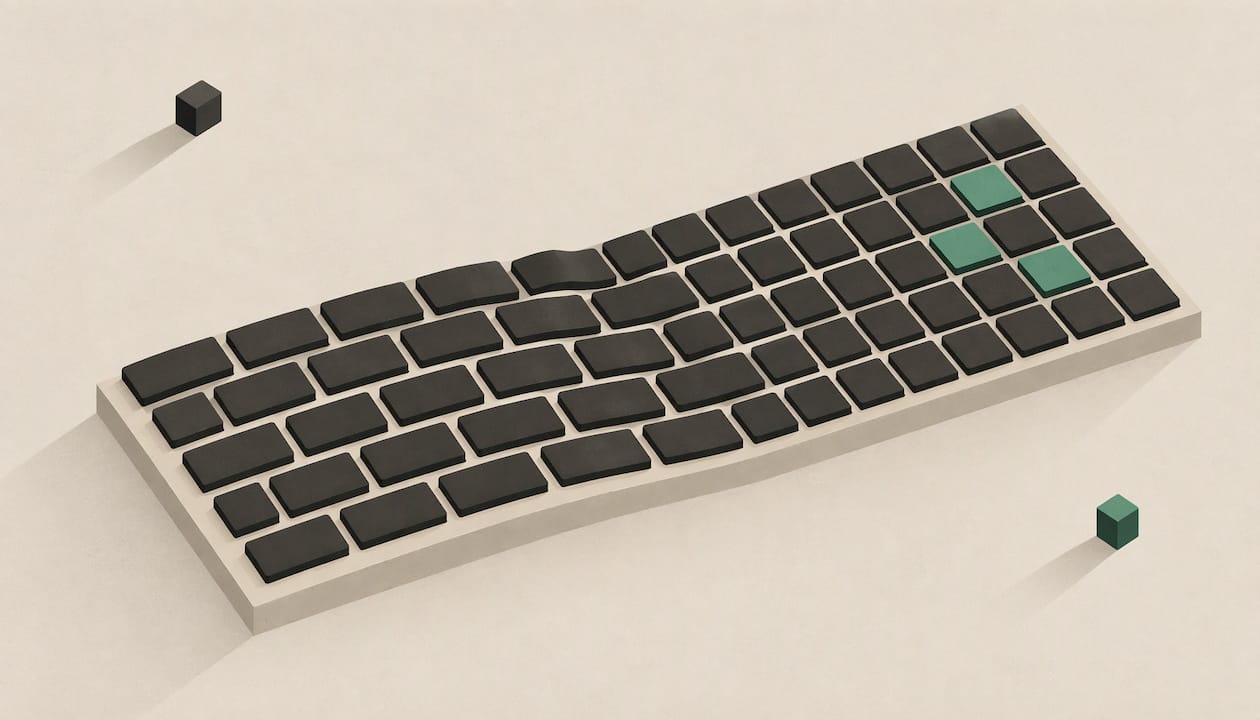
An ortholinear keyboard layout puts every key in a straight grid, with rows and columns lined up, instead of shifting each row sideways the way a standard keyboard does. You may also see it called a matrix layout or a grid layout. They are the same idea. The main practical effect is that your fingers travel straight up and down rather than at a slant, and the main cost is a short adjustment period.
Below we explain what changes, what it means for comfort, speed and gaming, and how to choose between a grid and a staggered board.
TL;DR
- Ortholinear, matrix and grid all describe keys aligned in straight rows and columns, with no row offset.
- A staggered board shifts each row by a fraction of a key. That is a typewriter leftover, not a typing requirement.
- Expect a temporary dip in speed while your muscle memory adjusts, then a more direct finger motion.
- Ortholinear boards are usually compact, so the number row and some keys often move to layers.
- Our KeBe keyboards pair a straight-column grid with the Matrix-Dvorak layout, assembled by hand in Canada.
Table of Contents
- What an ortholinear keyboard layout is
- Ortholinear vs staggered: the actual differences
- What the grid changes for your hands
- The first weeks: what switching feels like
- Speed and accuracy
- Gaming on a grid
- Ortholinear and Dvorak together
- Compact or full size: choosing your grid
- Our perspective
- Try a KeBe grid keyboard
- FAQ
- Sources
What an ortholinear keyboard layout is
"Ortholinear" is short for "orthogonal and linear". Every key sits directly above and below its neighbours, so the keycaps form a rectangle. Matrix layout and grid layout mean the same thing in everyday use: a uniform grid of mostly single-width keys.
It is a change in geometry, not in letters. As How-To Geek explains, an ortholinear board keeps the same general map of keys you already know, just perfectly straight and parallel. To make that work, keys such as Control, Enter and Shift are usually cut down to one key width, or doubled up to keep the edges even.
That is also why people mix up two separate things. Ortholinear is about where the keys sit. QWERTY versus Dvorak is about which letters go where. You can combine any letter arrangement with any geometry, and we come back to that with Dvorak below.

Why standard keyboards are staggered
Stagger comes from mechanical typewriters. Each key was attached to a bar that struck the paper, so the rows had to be offset to fit the linkages. How-To Geek notes that this constraint no longer applies to modern electronic keyboards. The offset stayed because everyone was used to it.
Ortholinear vs staggered: the actual differences
On a standard keyboard, the rows are shifted sideways, which is called row stagger. According to Keyboard Builders, on a US layout the A row starts a quarter key to the right of Q, and Z sits another half key along. So when a finger moves from the home row to the row above or below, it travels at a slant. An ortholinear board shifts nothing.
| Staggered (standard) | Ortholinear (grid) | |
|---|---|---|
| Row offset | Each row shifted sideways | None, rows are aligned |
| Finger path up and down | Diagonal | Straight |
| Typical size | Often full size, around 104 keys | Often compact, around 40 to 50 keys |
| Edge keys | Wide Shift, Enter, Backspace | Usually one key wide or doubled |
| Number row | Usually present | Often moved to a layer on small boards |
| Familiarity | Works on any desk or laptop | Needs a short adaptation |
The size row deserves a note. Spacehop describes ortholinear boards as usually having around 40 to 50 keys, against roughly 104 on a standard keyboard. That is a convention of the scene rather than a rule of the grid: a taller grid that keeps a number row is entirely possible, and a grid is simply a way of arranging whatever keys you choose.
Grid versus column stagger
People sometimes use "ortholinear" for any board with straight vertical columns. A strict grid has no stagger in either direction. A column-staggered board keeps columns vertical but shifts each column up or down to match finger length. Both reduce the diagonal reach, but they feel different under the hand. When you read reviews, check which one is being described.

What the grid changes for your hands
The case for a grid starts with how fingers move. As XDA Developers argues, finger joints are designed to move a fingertip up and down in a plane as the finger curls, while staggered rows push you into diagonal stretches. Straight columns suit that motion.
We want to be careful about what is proven. Research on alternative keyboards is mixed on health outcomes. A 1997 CDC/NIOSH ergonomics study of alternative keyboard designs found that split keyboards significantly reduced ulnar deviation, but said it is unknown how far they reduce the frequency or severity of work-related musculoskeletal disorders, because those disorders have many causes. Keyboard geometry is one factor among posture, desk height, breaks and workload.
A study published on ergocanada.com by Garth Humbert looked at a split matrix-style keyboard. It reported minimal to no forearm pronation, ulnar deviation and wrist extension in its participants, which the author attributed to the split layout, the large central Enter and Backspace keys and consistent minimum finger travel. In the same study, 16 of 26 women and 8 of 17 men reported repetitive strain symptoms at the start. After five weeks, 15 of those women and 6 of those men reported significantly lessened pain and symptoms, and 41 of 43 participants were still using the keyboard after six months.
That is one small study of one design, so read it as encouraging rather than a guarantee. If you already have pain in your hands, wrists or forearms, a physiotherapist or occupational therapist who knows computer work is the right person to see about your setup. A keyboard is a tool to support that advice, not a replacement for it.
For a wider look at what ergonomic features do and don't do, see our guide to ergonomic mechanical keyboard benefits, and for the basics of the category, ergonomic keyboard vs regular.
The first weeks: what switching feels like
The adjustment is real and worth planning for. Your fingers have learned the offsets of a staggered board, so for the first days your pinky and ring finger will aim a little off. People who write about switching describe the first sessions as noticeably slower, with accuracy returning before speed does.
The aim is not just to get back to your old pace. Tom's Hardware put it this way in a review of a contoured, ortholinear-style board: the point is to become a faster, more accurate typist than before, trading some short-term productivity for long-term gain. Treat that as a view from one reviewer rather than a promise, but it is a sensible way to frame the process.
A few habits make the transition smoother:
- Pick a calm week. Start when you do not have a hard deadline.
- Practise in short sessions. Ten to fifteen minutes of deliberate typing practice beats an hour of frustrated work.
- Keep your fingers on the home row. The grid rewards straight, small movements. Resist reaching with the wrong finger.
- Focus on accuracy first. Speed follows once the new positions feel automatic.
- Expect to be slower on other keyboards for a while. Many people switch their main desk and accept that a laptop keyboard feels different.
Our boards include a typing trainer for exactly this stage, so you can practise the new geometry without having to improvise exercises.
Starting from a standard setup
Most of us began on a conventional board, often a standard wireless keyboard and mouse set. That background is why the first grid session feels odd, and why the shift happens in the fingers rather than the head.
Speed and accuracy
Straighter finger paths can help accuracy once you have adapted, because each finger has one clear route to each key. Speed is more personal. Your typing speed after the switch depends on how much you practise, which letter arrangement you use and how much you rely on layers for keys that moved.
We do not claim a fixed percentage gain, because none that we could cite is settled. What we can say is that the shape of the improvement is typical of any deliberate retraining: a dip, a recovery, then comfort at a pace you can sustain. If speed matters to your job, build the adjustment into your schedule, as above.
Gaming on a grid
Gamers often ask whether an ortholinear board slows reaction. Positions of common keys such as WASD stay where you expect them, so there is less to relearn than for typing. A Epomaker Luma40 review at KeenGamer found that gaming on a 40% ortholinear board needs less adaptation than typing, and that the short travel of low-profile switches makes inputs feel quick and immediate. The same review notes that the compact form factor is not tuned for high-pressure competitive play, so think about which games you play and how many keys you bind.
Switch choice matters here as much as layout. Our guides to low profile keyboards, short travel keyboards and linear vs tactile switches cover the trade-offs.
Ortholinear and Dvorak together
Because geometry and letter arrangement are independent, you can run Dvorak on a grid. Dvorak places the most-used letters on the home row, which cuts how far your fingers travel. A grid cuts the sideways drift as you move between rows. The two ideas aim at the same thing from different directions: less finger movement.
That is the logic behind our Matrix-Dvorak layout. We pair a straight-column key grid with hand-centred letter placement so the common letters sit where your fingers rest. If you write code, our programmer Dvorak guide shows how symbols and brackets fit in. Learning a new letter arrangement and a new geometry at once is a bigger change than either alone, so give yourself the full practice routine above.
Compact or full size: choosing your grid
Before buying, decide how many keys you really use.
- If you type prose all day, you may rarely touch function keys or the numpad. A compact grid with layers can feel clean and fast.
- If you work with numbers or code, check how the number row and symbols are handled. Many compact designs move them to a layer, which is a habit to learn.
- If you game, list your bindings and make sure they fit without awkward layer holds.
- If you like to customise, look for hot-swappable switches and per-key lighting, so you can change the feel and the look later.
Switch type is the other decision. We cover the broader choice in mechanical vs membrane keyboards and optical vs mechanical.
Our perspective
We built KeBe around one observation: the diagonal reach of a staggered keyboard is a historical accident, and typists should not have to keep paying for it.
Our Matrix-Dvorak boards put the keys in a straight-column grid and place the letters around the centre of your hands. The goal is simple: minimize finger movement, and with it the fatigue that builds over long typing days. Our mechanical KeBe v2 and the slim KeBe Lite both follow that principle.
We also think comfort should come with the features people actually enjoy. Our boards use low-profile switches, hot-swappable keys, per-key RGB lighting, an integrated USB-C port and hub, and a screwless nylon case, and each one is assembled by hand in Canada. We added a dual-spacebar design and automatic typo correction because a new geometry should forgive the odd slip while you settle in, and a built-in typing trainer so the learning curve has a clear path.
The adjustment period is part of any real improvement, and we design for it rather than hiding it. Give your hands a couple of weeks, and the grid starts to feel like the obvious way to lay out keys.
Joshua
Try a KeBe grid keyboard
If you are ready to move from reading about grids to typing on one, our store lists the KeBe v2, the KeBe Lite and upcoming models, with pre-orders and a waitlist for new releases. Each board combines the Matrix-Dvorak layout with low-profile, hot-swappable switches and per-key RGB lighting, assembled by hand in Canada.

Browse the current range in the KeBe Canada store, or see our ortholinear Dvorak keyboards assembled in Canada if you are ordering from the United States.
FAQ
Are matrix, grid and ortholinear layouts the same thing?
In everyday keyboard talk, yes. All three describe keys aligned in straight rows and columns with no sideways offset between rows. Some people use "ortholinear" strictly for a flat grid and "columnar" for boards whose columns are shifted up or down, so check the product description.
Is an ortholinear keyboard better than a staggered one?
It depends on what you value. A grid gives straighter, more direct finger motion, which many typists find more comfortable. A staggered board is familiar everywhere. If you want less finger movement and are willing to practise for a couple of weeks, a grid is a strong choice.
How long does it take to get used to an ortholinear layout?
Plan for a noticeable slowdown at first, with accuracy returning before speed. Short daily practice sessions help most, and a typing trainer makes them structured. Everyone adapts at their own pace, so we do not promise a set number of days.
Can I use Dvorak on an ortholinear keyboard?
Yes. Letter arrangement and key geometry are independent, so Dvorak works on a grid. Our Matrix-Dvorak boards combine the two on purpose, to shorten finger travel in both directions.
Are ortholinear keyboards only for small boards?
No. Most that you can buy are compact because the style grew out of small custom boards, but a grid can hold a number row and more. Decide how many keys you use daily and choose the size to match.
Sources
- How-To Geek: What Is an Ortholinear Keyboard, and Should You Use One?
- Keyboard Builders: Ortholinear, row stagger and column stagger
- Spacehop: What is an ortholinear keyboard?
- XDA Developers: Why staggered keyboard layouts have overstayed their welcome
- CDC/NIOSH: An Ergonomics Study of Alternative Keyboard Designs
- ErgoCanada: keyboard study by Garth Humbert
- Tom's Hardware: Kinesis Advantage360 review
- KeenGamer: Epomaker Luma40 keyboard review
- Standard wireless keyboard and mouse set