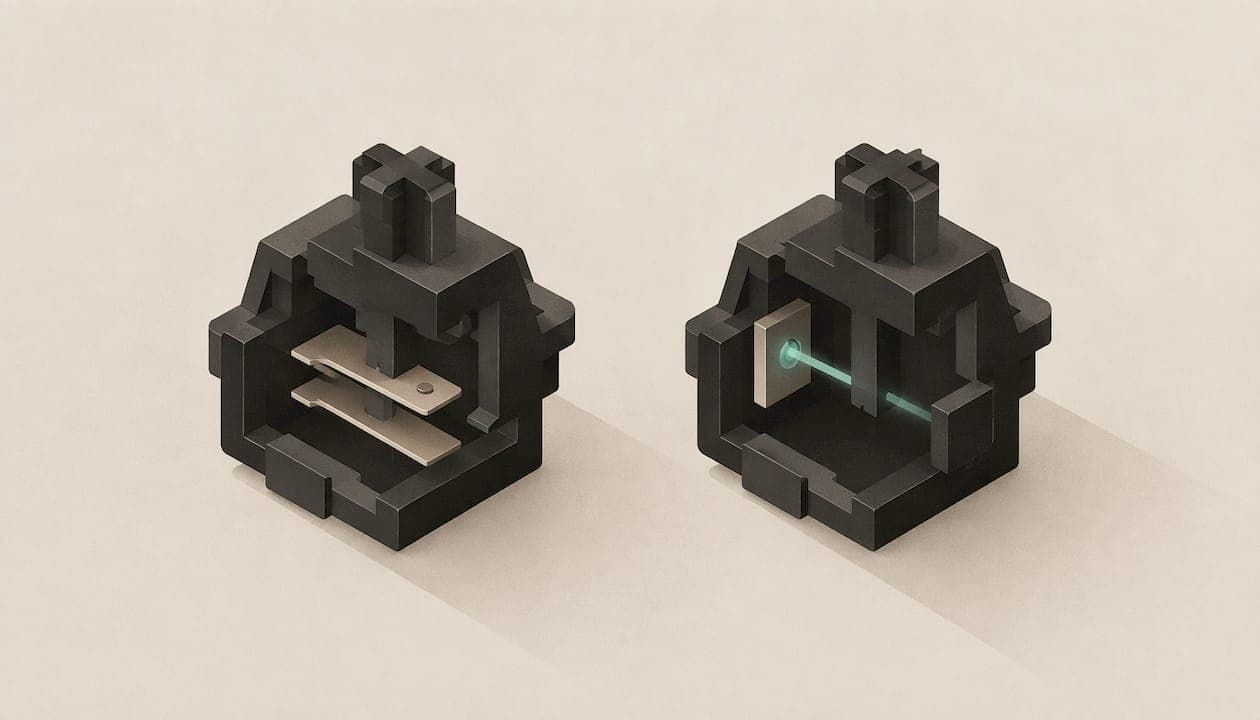
The difference comes down to how a key press is detected. A conventional mechanical switch closes a metal contact to complete a circuit. An optical switch breaks a beam of light instead. Optical can be a few milliseconds faster on paper, while mechanical gives you far more choice of feel, sound, size and price. For most typists and most gamers in Canada, a well-built mechanical keyboard is the easier and more flexible buy. Optical is worth a look if raw reaction time in competitive games is your priority.
TL;DR
- Mechanical switches register a press when metal contacts touch. Optical switches register it when a stem interrupts a light path.
- Optical switches skip the debounce delay of roughly five milliseconds that mechanical switches carry, so they can respond slightly faster. Most people will not feel the gap while typing.
- Mechanical keyboards come in many more switch types, sizes and price points, and tend to be easier to find in Canadian stores.
- Feel matters more than sensing method for daily typing: pick linear, tactile or clicky first, then worry about the technology underneath.
- If you type a lot, layout, key travel and comfort will change your day more than the optical-versus-mechanical question.
Table of Contents
- How each switch detects a keypress
- Speed and latency: what the numbers mean
- Feel, sound and choice
- Durability: read the ratings carefully
- Price and availability in Canada
- Who should choose which
- A simple way to decide
- Our perspective
- Try a KeBe keyboard
- FAQ
- Sources
How each switch detects a keypress
Both kinds of switch look similar from above. Inside, both generally use a stem and a spring to move the key and push it back up. The difference is what happens at the moment of actuation, as MakeUseOf explains: a conventional mechanical switch sends its signal through electrical contact, while an optical switch relies on a beam of light being interrupted.

Mechanical switches: metal contacts
When you press a conventional mechanical key, the stem pushes two small metal contacts together. The circuit closes, and the keyboard's controller reads that as a keypress. The spring and stem shape decide how the key feels on the way down: smooth and even (linear), with a bump you can feel (tactile), or with a bump and an audible click (clicky).
This is the design behind most enthusiast keyboards, and it has a decades-long ecosystem of switches, keycaps and accessories around it.
Optical switches: a beam of light
An optical switch uses an infrared light source and a detector. As the stem moves down, it blocks or changes the light path, and the sensor reports that change as a press. There is no metal contact to close, so there is nothing to bounce.
That last point is where the speed claim comes from, and it is worth understanding properly.
Speed and latency: what the numbers mean
Metal contacts do not close cleanly. They can flutter for a moment, so keyboards add a short wait called debounce to avoid registering one press as several. According to MakeUseOf, mechanical switches carry a debounce delay of around five milliseconds, while optical switches do not, which gives them a response that is generally around 5 ms faster.
Put that in context:
- Five milliseconds is one two-hundredth of a second. It is measurable in a lab and can matter at the very top of competitive play.
- For writing emails, code or documents, you will not notice it. Your own finger travel, posture and accuracy swamp it.
- Speed is not only about sensing. As the same MakeUseOf piece notes, how fast a switch feels also depends on the force needed and how far the key travels before it actuates.
That second point is useful when you shop. A mechanical switch with a short actuation distance and light spring can feel snappier than a heavier optical one. Compare the specification sheet, not just the sensing technology.
Analog optical: a gaming extra
Some optical designs can measure how far the key is pressed, not just whether it is pressed. Tom's Hardware describes how this lets a game read variable input pressure, so a character's movement can depend on how deep you press. That is a genuine advantage for certain games and creative tools. It is not something a typist will use.
Feel, sound and choice
If you spend hours at a keyboard, this section matters most.
Mechanical switches offer linear, tactile and clicky options, and MakeUseOf points out that they cover a broader range of brands and types and can be more satisfying to use. That breadth is the real strength: you can choose a quiet, light linear for an open-plan office, a pronounced tactile bump for typing accuracy, or a clicky switch if you like the sound.
A few practical comparisons:
| Factor | Mechanical | Optical |
|---|---|---|
| How a press is sensed | Metal contacts close a circuit | Stem interrupts a light path |
| Debounce delay | Around 5 ms | None |
| Switch variety | Very wide: linear, tactile, clicky | Narrower |
| Keyboard sizes and styles | Compact to full-size, many designs | Fewer options |
| Price range | Budget to premium | Often higher |
| Best for | Typing, customization, general use | Competitive gaming, analog input |
If you are unsure which feel suits you, our guide to linear versus tactile switches walks through how each behaves under real typing.
Sound
Noise comes mostly from the key bottoming out, the spring, and the case, not from the sensing method. A quiet optical and a quiet mechanical switch can sound alike, and a clicky mechanical switch will be loud whatever you do. Judge sound by switch type and case construction.
Accuracy for everyday typing
Highly reactive switches can take getting used to. TechRadar notes that very responsive optical switches may produce more typos for people who often mispress keys. If you rest your fingers lightly on the keys, a switch with a tactile bump gives you a physical cue before it registers, which many typists find calming.
Durability: read the ratings carefully
You will see lifespan figures in the tens of millions of keypresses on both kinds of switch. Optical makers argue that, with no metal contact, there is less wear on the part that senses the press, and some reviews repeat that. The fair reading is that both types are rated for far more presses than most people will ever make, and a rating is a manufacturer's test result, not a guarantee of how your keyboard will age.
In practice, other things fail or wear first:
- Keycap legends rub off on cheaper plastics.
- Stabilizers on long keys can rattle or stick.
- Spills and dust affect any keyboard.
- Cable and port damage is more common than switch failure.
If longevity is a priority, look at the warranty, the case construction and whether switches can be replaced. A keyboard where you can swap a single switch without soldering ages far better than one where a failure means replacing the board. We cover this in hot-swappable keyboards and how to choose one.
Price and availability in Canada
Mechanical keyboards span the full range, from entry-level boards to premium builds. Optical keyboards are often more expensive and less widely stocked. TechRadar attributes the premium to optical being a newer technology with fewer products on the market than the mature mechanical ecosystem.
For Canadian buyers, that translates into a few practical points:
- Choice is wider in mechanical, so you are more likely to find the size, layout and switch you want without importing.
- Imports add shipping, duties and exchange-rate costs. Check the final price in Canadian dollars at checkout before you compare.
- Replacement parts, keycaps and switches are easier to source for mechanical boards.
- Check that the return policy covers a keyboard you have tested for a week. Feel is personal.
Who should choose which
Competitive gamers
If you play fast shooters or rhythm games and want every possible millisecond, optical is a reasonable choice, and analog optical adds control in games that support it. If you play a mix of games and also work on the same machine, a mechanical board with a short actuation distance and a light spring gets you most of the way there, with far more freedom over how it feels.
Writers, coders and office workers
Choose mechanical. The variety of tactile and linear switches, quieter options and compact layouts matter more than a few milliseconds. Then look at what actually reduces strain: key travel, layout and wrist position. Our guides on ergonomic versus regular keyboards and short-travel keyboards cover those.

Tinkerers and customizers
Mechanical has the deepest pool of switches, keycaps and cases. If you like swapping switches to tune the feel, check that the board is hot-swappable and which switch types it accepts.
Anyone on a budget
Mechanical gives you more options at every price. If you are still deciding whether to leave a membrane keyboard at all, start with mechanical versus membrane.
A simple way to decide
- Decide how you use the keyboard. Mostly typing, mostly gaming, or both?
- Pick the feel first. Linear, tactile or clicky. This choice affects comfort more than the sensing method.
- Choose the size. Compact boards free desk space and shorten reaches. See 60% versus 75% if you are weighing it.
- Decide wired or wireless. Wired versus wireless matters for latency and convenience.
- Check replaceability. Hot-swap sockets let you change a switch instead of the whole keyboard.
- Compare the final Canadian price, including shipping and returns.
Our perspective
We build mechanical keyboards, so we will be plain about where we land. For people who type, the sensing method is the least interesting part of a switch. What you feel on the way down, how far your fingers travel and how your hands sit decide whether you are comfortable at the end of a long day.
That is why the KeBe v2 is a mechanical, low-profile, hot-swappable board with per-key RGB lighting, and why the KeBe Lite goes slimmer still. Low-profile switches shorten key travel, and the Matrix-Dvorak layout with its straight-column grid and hand-centred letter placement is designed to reduce finger movement. The dual-spacebar design, autocorrect and built-in typing trainer are there to make that layout easy to learn and comfortable to use.
We assemble every keyboard by hand in Canada, in a screwless nylon case with a USB-C port and an integrated hub. Mechanical gives us the freedom to tune all of this: the switch feel, the key layout and the ability to swap parts later. If a few milliseconds of debounce were what held back your typing, we would build around it. In our experience, it is travel, layout and posture.
Joshua
Try a KeBe keyboard
If you want a mechanical board built around comfort rather than a spec-sheet race, take a look at the KeBe range. The KeBe v2 is a low-profile, hot-swappable mechanical keyboard with an ortholinear layout, and the slim KeBe Lite suits people who want the shortest travel. Pre-orders and the waitlist for upcoming models are open through the store.

See current models and availability in the KeBe Canadian store. If you want to understand why we like thin boards first, read about low-profile keyboards and who they suit.
FAQ
Which is better, an optical or mechanical keyboard?
Neither wins everywhere. Optical can respond a few milliseconds faster because it avoids debounce, which matters mostly in competitive gaming. Mechanical offers more switch types, sizes and prices, which matters for typing and customization. For mixed use, mechanical is usually the safer choice.
What is the difference between optical and mechanical?
The difference is how the keypress is detected. Mechanical switches close metal contacts to complete a circuit. Optical switches use a light beam that the stem interrupts. Both generally use a stem and spring for the physical motion of the key.
Why do gamers prefer mechanical keyboards?
Many like the choice and the feel. Mechanical switches come in linear, tactile and clicky versions, and they are often more satisfying to use. Players can match the switch to their game and taste, and the wide range of boards keeps prices more accessible.
Will I notice the speed difference when typing?
Probably not. A debounce gap of around five milliseconds is far smaller than natural variation in your own keystrokes. Actuation distance, spring weight and switch feel will influence your typing speed and accuracy more than the sensing method.
Are optical keyboards harder to find in Canada?
Generally, yes. Optical boards have fewer models and tend to cost more than the mechanical range. Check the final price in Canadian dollars, including shipping and duties, and the return policy before you buy.
Sources
- Optical vs. Mechanical Switches: What's Best for Gaming? (MakeUseOf)
- How to choose which keyboard switch is right for you (TechRadar)
- What Are Optical Keyboard Switches, And How Do They Work? (Tom's Hardware)