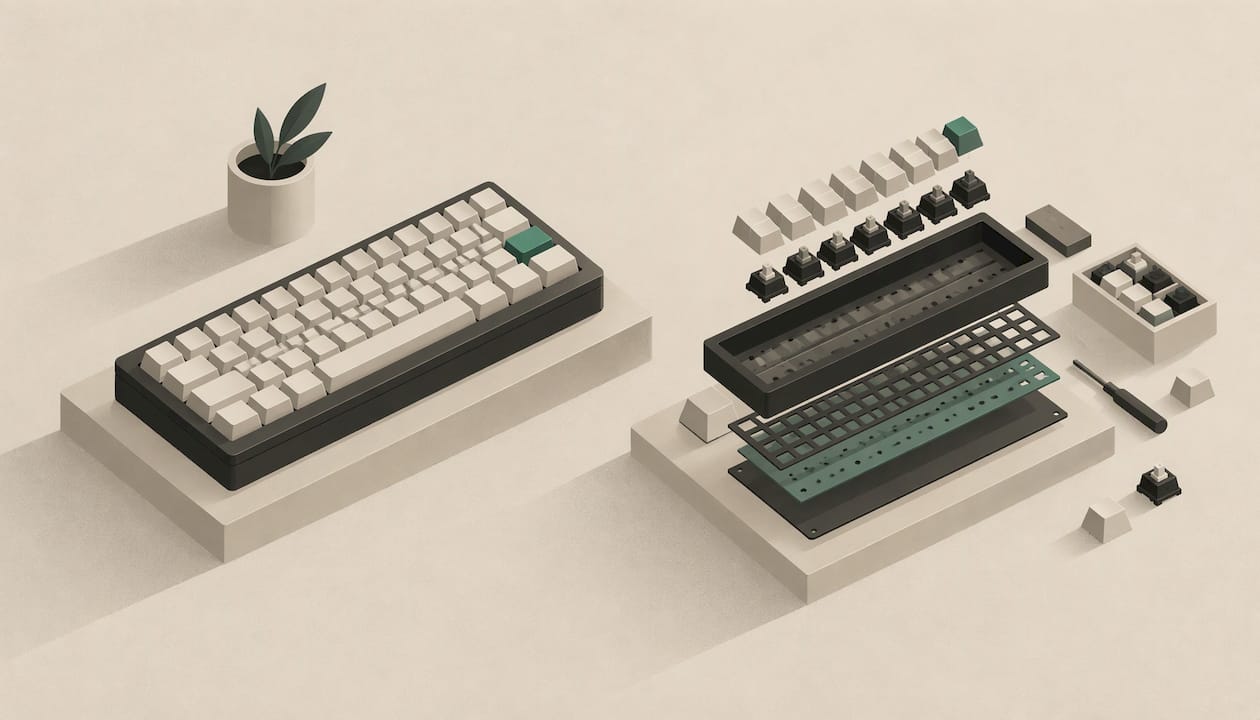
A prebuilt keyboard arrives assembled and ready to type on. A custom keyboard is one you tailor part by part, usually by sourcing a case, circuit board, switches and keycaps yourself. For most typists, gamers and professionals, the best answer sits between the two: a keyboard that is assembled for you but lets you change the parts that matter, like switches and keycaps. That is how we build KeBe keyboards, by hand in Canada, with hot-swappable switches and per-key RGB lighting.
Below you will find what each route really involves, what it costs in money and time, and how to decide. We also cover what to check before you pre-order.
TL;DR
- Prebuilt means convenience and a lower price. Custom means control over size, sound, feel and appearance, but also more research and usually more money.
- Hot-swappable boards narrow the gap: you get a finished keyboard and can still change switches later without soldering.
- For comfort, the layout and shape matter as much as the parts. Look for straight wrists and a compact footprint that stops you overreaching.
- Before you pre-order, confirm the seller's contact details, shipping terms, a delivery estimate, return policy and secure payment.
- KeBe keyboards are assembled by hand in Canada with a Matrix-Dvorak layout, hot-swappable keys and a dual-spacebar design.
Table of Contents
- What "prebuilt" and "custom" actually mean
- Cost: what you pay in money
- Time and skill: what you pay in effort
- Comfort and ergonomics: the part most comparisons skip
- Gaming: what to look for in either route
- Side-by-side comparison
- Layout: the choice a custom build does not make for you
- How to decide: five questions
- Pre-ordering a keyboard: a Canadian checklist
- Perspective from our workshop
- Where to start with KeBe
- FAQ
- Sources
What "prebuilt" and "custom" actually mean
The two words are used loosely, so it helps to pin them down.
A prebuilt keyboard is sold complete. You plug it in and type. Laptop Mag's 2024 comparison describes it as the ready-to-use option.
A custom keyboard gives you more say over size, look, sound and switch speed. The same guide notes that this usually costs more and demands research into the components. A full DIY build can involve a case, a PCB (the circuit board that reads your key presses), a plate that holds the switches steady, the switches themselves, keycaps, stabilizers (the small parts that keep long keys like the spacebar from wobbling) and sound-dampening foam.
The guide adds an important detail: choosing parts that fit together is often harder than the physical assembly. Many first-time builders discover that a case, plate and board have to match before a single switch goes in.
So "custom" does not have to mean "you build it from scratch." It is a spectrum:
- Fully prebuilt, fixed parts. Switches are soldered in. What you buy is what you keep.
- Prebuilt, hot-swappable. Assembled for you, with switches that pull out and click back in, so you can change feel later.
- Barebones kit. Case and board assembled, but you add switches and keycaps.
- Full DIY. You choose and assemble every component.
Most readers searching this question are really choosing between options 2 and 4, and that is where the decision gets interesting.
Cost: what you pay in money
Prebuilt boards are mass-produced, which generally keeps prices down. Laptop Mag suggests budgeting at least US$50 and ideally around US$100 for a mechanical keyboard, and notes that custom builds tend to cost more than mass-produced prebuilts.

A useful example comes from How-To Geek's 2025 article on custom keyboards. It cites one widely sold barebones kit at US$185 (US$129.99 on sale) and the fully assembled version of the same model at US$205 (US$149.99 on sale). The assembled version cost only about US$20 more than the kit, and then you still need to buy switches and keycaps for the kit. For a buyer who is not set on a hobby build, the assembled version is the better deal.
The lesson holds in any currency: with a kit, the sticker price is only the start. Add:
- Switches (you usually buy one per key, plus spares)
- Keycaps, if not included
- Stabilizers and lubricant, if you want smoother large keys
- Tools such as a switch puller or soldering equipment
- Shipping and, for imports into Canada, any duties and taxes
The price of a full DIY build is therefore harder to predict than a finished keyboard's price. Predictable cost is a real advantage of buying complete.
Time and skill: what you pay in effort
Assembling a board is a few hours of work for a patient beginner. Sourcing is the real time sink. You compare layouts, read compatibility notes, wait on group buys or restocks and sometimes order from several shops. If something does not fit, you start over.
A prebuilt board removes that entire stage. You choose a model and use it the same week it arrives. For a professional who types eight hours a day, or a gamer who wants to play tonight, that time matters more than the satisfaction of building.
If you do enjoy the process, a hot-swappable board still lets you tinker. Swapping switches takes minutes, with no soldering. Our KeBe boards, such as the mechanical KeBe v2, have hot-swappable keys and screwless nylon cases, so you can experiment without taking on a project.
Comfort and ergonomics: the part most comparisons skip
Most prebuilt-versus-custom articles compare parts and price. If you type for a living, comfort deserves equal weight.
The Canadian Centre for Occupational Health and Safety (CCOHS) is the federal body that publishes workplace ergonomics guidance. In its keyboard selection and use advice, it says there is no universally agreed best keyboard design. What it does recommend is keeping your wrists neutral and aligned with your forearms. It also suggests a shorter keyboard to reduce overreaching, which improves mouse placement, and key action that does not need forceful presses or produce extra characters. It also advises short breaks to stretch and let muscles recover.
Translate that into buying criteria:
- Compact footprint. A board without a number pad leaves room for your mouse close to your body. If you are left-handed, CCOHS notes you may prefer the number pad on the left or as a separate unit.
- Straight-line hand position. Your wrists should stay in line with your forearms rather than bending sideways.
- Light key action. Keys that actuate without hard presses.
- Fewer accidental characters. Typos waste time and cause extra corrections, which is where autocorrect helps.
A generic prebuilt board is made for the average hand and the average desk. A fully custom board can solve all of this, but only if you know what to ask for. A purpose-built ergonomic board that is already assembled gives you the result without the guessing.
For a deeper look at what helps, see our guide to ergonomic mechanical keyboard benefits, and if you are weighing shape against a standard board, ergonomic keyboard vs regular covers it.
Your desk matters as much as your board. Height and depth decide whether your wrists can stay neutral, so an ergonomic gaming desk setup is worth planning alongside the keyboard.
Gaming: what to look for in either route
Gamers often assume custom is the only route to a fast board. It is not. Wirecutter's gaming keyboard guide points to a handful of things that matter whichever way you buy:
- Switch feel and response
- Build quality and stable large keys
- Programmability, meaning remapping keys to your needs
- At least 6-key rollover, and ideally N-key rollover, which registers all keys pressed at once in the right order
That list shows where a prebuilt board is strongest. A finished keyboard from a maker who tests the assembled product has already solved stability and compatibility. On a DIY build, a wobbly spacebar or a mismatched plate is your problem to fix.
Polling rate (how often the keyboard reports to the computer) is one spec among several. Wirecutter suggests considering it, but the connection type matters too. Independent testing of one wireless-capable model reported under 1 ms wired and under 3 ms on a 2.4 GHz connection, versus 10 to 15 ms on Bluetooth. Those figures belong to that model and test, not to prebuilt or custom keyboards as a class. For fast response, a wired USB-C connection is a straightforward choice. Every KeBe keyboard includes integrated USB-C ports and a hub, so you can plug in a mouse or headset without extra adapters.
Side-by-side comparison
| Factor | Prebuilt (fixed) | Prebuilt, hot-swappable | Full custom build |
|---|---|---|---|
| Setup time | Minutes | Minutes | Hours, plus sourcing time |
| Upfront cost | Lowest | Moderate | Usually highest and least predictable |
| Changing switches | Needs soldering | Pull and replace | Depends on build |
| Compatibility risk | None | None | Yours to manage |
| Sound and feel tuning | Limited | Good | Maximum |
| Best for | Basic typing | Most typists, gamers, enthusiasts | Hobbyists who enjoy building |
The middle column is where most buyers end up happiest: nothing to assemble, and plenty to personalize.
Layout: the choice a custom build does not make for you
Parts are only half the story. The arrangement of keys decides how far your fingers travel. Standard keyboards use a staggered grid, with rows offset like a typewriter's. KeBe keyboards use the Matrix-Dvorak layout: a straight-column key grid with hand-centered letter placement, designed to minimize finger movement and typing fatigue.
This is a place where prebuilt wins by default. Finding an ortholinear (straight-grid) case, board and keycap set that all line up is a research project in the custom world. With a keyboard built around the layout, the work is done.
If you are new to Dvorak, our Dvorak vs QWERTY comparison explains the difference, and the practical plan to switch from QWERTY walks you through it. Our free typing trainer on the store site teaches one letter at a time.

Other things worth comparing if you are still choosing a switch or board type: mechanical vs membrane and split vs standard.
How to decide: five questions
- Do you want to type or to build? If typing, buy prebuilt. If building is the hobby, a kit or DIY is the point.
- Do you want to change switches later? Choose hot-swappable so the answer is yes at no extra effort.
- Does your body ask for something specific? If wrists, shoulders or overreaching bother you, prioritize a compact, straight-line layout over parts lists.
- What is your real budget? Count the whole build, not only the kit price.
- How soon do you need it? Sourcing delays can stretch a custom build over weeks.
Pre-ordering a keyboard: a Canadian checklist
New and limited keyboards are often sold by pre-order, meaning you pay before the product ships. That is normal, and a few checks keep it comfortable. The Office of Consumer Affairs at Innovation, Science and Economic Development Canada has guidance for online shoppers that applies directly. It advises you to confirm:
- The seller's contact information
- Sale and shipping terms
- Complaint and return policies
- Secure payment options
- A delivery date
- A saved copy of the contract terms
Before paying, screenshot or save the order page and confirmation email. Write down the estimated shipping window. Note which currency you are paying in, and whether the total includes taxes and shipping. For a pre-order, that estimate is the most important line: new products can take time to produce, and a clear window sets your expectations.
With KeBe, you can pre-order upcoming models and join the waitlist, so you are first in line. Every keyboard is assembled by hand in Canada. Open the store page for the models available now and the ones coming.
Perspective from our workshop
We started KeBe because the choice usually felt like a trap. Buy a standard board and live with the stagger, the reach and the typos. Or spend weeks sourcing parts for a custom board and hope they fit.
Our answer is a keyboard that arrives finished but is built for you. The Matrix-Dvorak layout puts letters where your hands rest, in straight columns, so your fingers travel less. The mechanical KeBe v2 and the slim KeBe Lite both use low-profile switches, and the keys are hot-swappable, so the board can change when your taste does.
We add the things we wanted ourselves: per-key RGB lighting, a built-in USB-C hub, autocorrect, a typing trainer and a dual-spacebar design. The screwless nylon case is assembled by hand in Canada.
If you love building, nothing stops you from treating a hot-swappable keyboard as a platform. If you just want a better way to type, you can skip straight to using it.
Joshua
Where to start with KeBe
If you want the benefits of a custom keyboard without the sourcing, KeBe is made for that. You get an ergonomic Matrix-Dvorak keyboard with hot-swappable keys, per-key RGB, a built-in USB-C hub, autocorrect and a dual-spacebar design, assembled by hand in Canada. Pre-orders and a waitlist cover upcoming models.

Browse the current models and pre-order options on the KeBe store.
FAQ
Is a custom keyboard always better than a prebuilt one?
No. Custom gives more control over size, sound and feel, but it costs more time and usually more money. A prebuilt keyboard suits anyone who mainly wants to type or game. A hot-swappable prebuilt board adds the customization on top.
Does a custom keyboard have to be built by me?
Not necessarily. A custom keyboard is one tailored to your choices, and the assembly can be done for you. At the other end, a full DIY build means you choose every part and put it together yourself.
Is a prebuilt keyboard cheaper than a custom build?
Generally, yes. Mass production keeps prebuilt prices down, and Laptop Mag notes that custom builds tend to cost more. With a kit, remember to add switches, keycaps and tools. In one US example, the assembled version cost only about US$20 more than the barebones kit.
What should I check before pre-ordering a keyboard?
Confirm the seller's contact details, shipping terms, return policy, secure payment and a delivery date. Save a copy of the terms, as Canada's Office of Consumer Affairs advises online buyers. Note the estimated shipping window so you know when to expect it.
Which is better for gaming?
Look at switch response, stable construction, remapping and at least 6-key rollover, whichever route you pick. A wired USB-C connection is a simple way to get consistent response. A finished keyboard saves you from fixing fit and stability problems yourself.
Sources
- Custom mechanical keyboards vs. pre-built, Laptop Mag (2024)
- Custom Keyboards Are Expensive (But Totally Worth It), How-To Geek (2025)
- Office Ergonomics: Keyboard Selection and Use, CCOHS
- The Best Gaming Keyboards, Wirecutter
- Online shopping, Office of Consumer Affairs (ISED Canada)