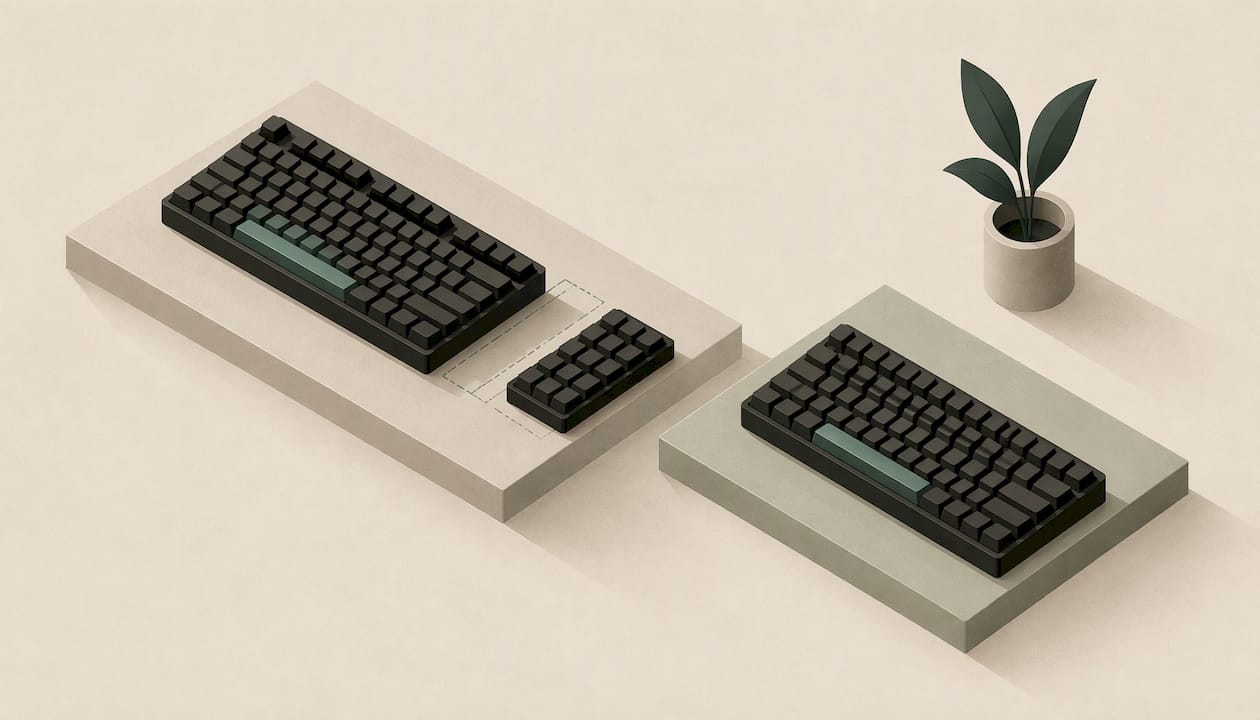
A tenkeyless (TKL) keyboard is a full-size keyboard with the numeric keypad cut off the right side. Everything else stays: the letters, the function row, the arrow keys and the navigation block. Pick a TKL if you rarely type numbers in bulk and want your mouse closer. Pick a full-size board if the numpad earns its place in your daily work.
That is the whole decision in two sentences. The rest of this guide helps you test it against your own desk, your hands and your job.
TL;DR
- A TKL drops only the numeric keypad. A full-size board keeps it, which is why the full-size is wider.
- Going by HLPLANET's to-scale chart, a TKL is about 8.1 cm narrower than a full-size board, so the mouse sits closer to your body.
- Choose full-size if you enter numbers all day. Choose TKL for gaming, general office work and small desks.
- If you only need numbers now and then, a TKL plus a separate number pad covers both cases.
- Whatever the size, the layout and key feel matter as much as the footprint.
Table of Contents
- What is the difference between a tenkeyless and a full-size keyboard?
- Is TKL the same as an 80% keyboard?
- Desk space and mouse position
- Gaming: does TKL help?
- Work: when the numeric keypad earns its place
- Customization, keycaps and typing feel
- Which one should you choose?
- Perspective: size is only half of the comfort equation
- Explore KeBe keyboards
- FAQ
- Sources
What is the difference between a tenkeyless and a full-size keyboard?
A full-size keyboard, also called a 100% board, has every key on the standard layout: the main typing block, the function row, the arrow keys, the six-key navigation cluster (Insert, Home, Page Up and friends) and the numeric keypad on the right. HLPLANET lists 104 keys for a full-size ANSI board and 87 for a TKL, which is the 17 keys of the keypad.
The name says it: "tenkeyless" means without the ten-key pad. Nothing else is meant to be missing. According to the Keyboard Wiki, the layout most likely descends from IBM's space-saving keyboard, which appeared after IBM standardised the full Enhanced Keyboard layout.
Here is the practical comparison:
| Full-size (100%) | Tenkeyless (TKL, 80%) | |
|---|---|---|
| Keys (ANSI) | 104 | 87 |
| Approx. size | 45.0 × 14.5 cm | 36.9 × 14.5 cm |
| Numeric keypad | Yes | No |
| Function row | Yes | Yes |
| Arrow keys and navigation block | Yes | Yes |
| Mouse distance | Further right | About 8.1 cm closer |
Sizes and key counts come from HLPLANET's chart. Individual models vary by a few millimetres because of bezels and case design.
Is TKL the same as an 80% keyboard?
In everyday use, yes. People call a TKL an 80% keyboard because it is roughly four-fifths the width of a full-size board, and the two terms refer to the same layout on shop pages.
The confusion comes from the smaller sizes. The Keyboard Wiki notes that the word tenkeyless has no precise definition and has sometimes been applied to what we now call 75% boards. A 75% keyboard squeezes the navigation cluster into a single column and tucks the arrow keys into the main block. It keeps the function row but is clearly more compact than a TKL.
So when you shop:
- TKL or 80%: separate arrow keys, a visible navigation block, no keypad.
- 75%: the same keys, packed tighter, with the navigation cluster squeezed into one column.
- Anything unlabelled: check the product photo, not just the name.
If you are weighing the smaller options as well, our guide to 60% vs 75% keyboards walks through what you give up at each step.
Desk space and mouse position
The biggest real-world difference is not the keys, it is where your right hand ends up.
On a full-size board, the keypad sits between your typing hand and your mouse. Per HLPLANET's figures, a TKL gives the mouse 8.1 cm more room. For a gamer who sweeps the mouse across a pad, that is the difference between a comfortable arc and a cramped one. For a person on a 120 cm desk, it can decide whether the keyboard and mouse fit side by side at all.

There is a health angle, too. Canada's occupational health agency, CCOHS, suggests considering a shorter 35.6 cm (14 inch) keyboard rather than a regular 45.7 cm (18 inch) one, to reduce overreaching and give you more options for placing the mouse. It also notes that left-handed people may prefer a keyboard with the numeric pad on the left, or a separate pad.
Why does reach matter? CCOHS explains that when the mouse sits beyond easy reach, you lean forward and reach outward, which loads the trapezius and deltoid muscles and can leave your shoulder and neck sore over a workday. If you get that kind of tightness on the mouse side, check your mouse distance before anything else. If it persists or is painful, see your doctor or an occupational therapist.
How far your elbows, wrists and keyboard sit from each other also depends on the surface. A tray that lets the board drop to elbow height changes the picture, and the benefits of a keyboard tray are worth reading alongside this comparison if your desk is the wrong height for either size.
A quick desk test
Before you buy, measure rather than guess:
- Sit at your normal working height with your upper arms relaxed beside your body.
- Place your hands on the home row of your current keyboard.
- Note where your mouse hand rests. If you must angle your forearm outward or stretch past the keypad, a narrower board will help.
- Measure the usable width of your desk or tray and subtract the mouse pad. Compare what is left with the 45.0 cm and 36.9 cm figures above.
Gaming: does TKL help?
For most games, the extra width of a full-size board does nothing, because the keypad is rarely bound to anything. What you notice is mouse room. Low-sensitivity players who swipe widely get the most from a TKL. Players who sit far from the screen and use small mouse movements may not notice any difference.
A few other points:
- Portability: a TKL is lighter and easier to pack for a LAN party or a trip.
- Macros and extra binds: if you use the keypad as a macro pad in a game or in streaming software, a full-size board keeps those keys within reach. Otherwise, a small separate pad does the same job and sits on whichever side you prefer.
- Response and feel: switch type, key travel and polling rate matter far more to responsiveness than size. If you are comparing those, see our comparison of optical vs mechanical keyboards.
Work: when the numeric keypad earns its place
The keypad is a tool, and some jobs lean on it hard. If you key in figures all day (bookkeeping, data entry, inventory, spreadsheets with long columns of numbers), the keypad's calculator-style layout lets you enter digits with one hand and without looking. Reaching for the number row along the top of a TKL is slower and breaks the rhythm.
A sensible rule for work: choose the narrowest layout that keeps the keys your work actually depends on.
- Frequent or high-stakes number entry: keep a full-size board.
- Occasional numbers: a TKL with a separate number pad that you can push aside.
- Mostly writing, email, code and browsing: a TKL is a comfortable default, because you keep function keys and arrows without the extra width.
The separate pad is an underrated middle path. It lets you set the mouse where you want it and bring the pad over only when needed. CCOHS points the same way: it mentions separate numeric pads as an option for people who want the mouse nearer.
If you are a programmer or writer, you may also be asking whether you need the navigation cluster. On a TKL you still have it, which is a good reason to prefer it over a 75% board when you rely on Home, End and Page Up or Down while editing.
Customization, keycaps and typing feel
Size also affects how much you can personalize a board. Hot-swappable switches and keycap sets work on any size, but keycap kits are often sold to fit a full-size layout. Hardware Canucks points out that if you buy a custom set designed for a full-size board and use it on a TKL, you will be left with many unused keycaps. Check the kit contents before you order.
Layout matters too. Size decides which keys you have; layout decides where the letters are. If your wrists and fingers tire from travelling across a standard grid, it is worth looking beyond the size question. Our pieces on ergonomic vs regular keyboards and Dvorak vs QWERTY cover that ground, and the mechanical vs membrane comparison covers feel.
Which one should you choose?
Use this as a shortcut:
| If you... | Choose |
|---|---|
| Enter numbers for hours every day | Full-size |
| Game with wide mouse swipes | TKL |
| Have a narrow desk or share a workspace | TKL |
| Need numbers sometimes but want mouse room | TKL plus a separate number pad |
| Carry your keyboard between home and office | TKL |
| Use the keypad for macros or shortcuts | Full-size |
| Prefer the smallest footprint and can live without a separate navigation block | Look at 75% or smaller |
If you are torn, ask which cost you feel more: the missing keypad or the extra reach to the mouse. Most people who do not use the keypad daily find they stop missing it within a week, while the reach penalty of a full-size board is felt every hour.
Perspective: size is only half of the comfort equation
We build keyboards around one idea: your fingers should travel less. That is why we start with the layout. Our Matrix-Dvorak boards use a straight-column key grid and hand-centred letter placement, which is designed to cut finger movement and the fatigue that comes with it.
Size and layout work together. Trimming the keypad brings your mouse hand in. A straight-column grid with a sensible letter arrangement then reduces how far your fingers go once they are on the keys. Neither alone solves everything, and that is why we think about both when we design a board.
We also think comfort should come with control. Our keyboards offer hot-swappable switches, low-profile switches, per-key RGB lighting, a built-in USB-C hub, autocorrect and a dual-spacebar design, and we assemble them by hand in Canada. If you type for a living or for play, we want the board to fit how you work, not the other way around.
Joshua
Explore KeBe keyboards
If you are ready to move past a standard grid, KeBe keyboards combine the Matrix-Dvorak layout with low-profile switches, hot-swappable keys, per-key RGB lighting, integrated USB-C ports and a hub, a typing trainer and autocorrect. Models include the mechanical KeBe v2 and the slim KeBe Lite, and each is assembled by hand in Canada. Pre-orders and a waitlist are available for upcoming models.

Browse the lineup in the KeBe Canadian store to see current models and ordering options. If you want to know how short key travel feels first, our guide to low profile keyboards is a good place to start, and our article on split spacebar keyboards explains the dual-spacebar design.
FAQ
What size is a tenkeyless keyboard?
A TKL measures about 36.9 × 14.5 cm (14.5 × 5.7 in) and has 87 keys on an ANSI layout, according to HLPLANET's size chart. A full-size board is about 45.0 × 14.5 cm with 104 keys. Real products differ by a little depending on their case and bezel.
Why are 80% keyboards called tenkeyless?
The two names describe the same thing from different angles. "Tenkeyless" refers to the missing ten-key numeric pad, and "80%" refers to the size relative to a full-size board. Both mean a full keyboard without the keypad.
Is a TKL better than full-size for gaming?
For most players, yes, because the shorter body leaves more room for mouse movement. The difference matters most if you use low mouse sensitivity or have a tight desk. If you rely on the keypad for binds or macros, a full-size board or a separate pad suits you better.
Can I add a number pad to a TKL later?
Yes. A separate USB number pad works with a TKL, and you can place it on either side of the mouse. This suits people who need numbers occasionally and want the flexibility to move the pad out of the way. CCOHS also lists a separate numeric pad as an option for left-handed users.
Is a TKL the same as a 75% keyboard?
No. A 75% board is more compact: it squeezes the navigation block into one column and moves the arrow keys into the main block. A TKL keeps a full navigation cluster and separate arrow keys, so it is wider.
Sources
- HLPLANET: Keyboard Sizes Compared, Interactive To-Scale Chart
- CCOHS: Office Ergonomics, Keyboard Selection and Use
- CCOHS: Office Ergonomics, Computer Mouse Common Issues
- Hardware Canucks: How to Choose the Right Keyboard Size
- Keyboard Wiki: Tenkeyless keyboard